Hyvä Theme Migration Guide: When to Switch and What to Expect
 13 mins read
 13 mins read
You’ve already invested in performance optimization, but page load times are still unacceptable? Hyvä theme migration may be the next step, especially if you already plan a Magento upgrade.
However, replacing the Magento 2 front end with Hyvä is not a cosmetic change. It means full storefront re-architecture, with upfront time and budget required. Over time, this investment can pay off through stable performance, strong Core Web Vitals (CWV) metrics, and easier long-term support.
We saw this firsthand while working with a German plant store. After the new front end went live, speed metrics improved, and two years later, the site still stays in the “green zone” with basic support.
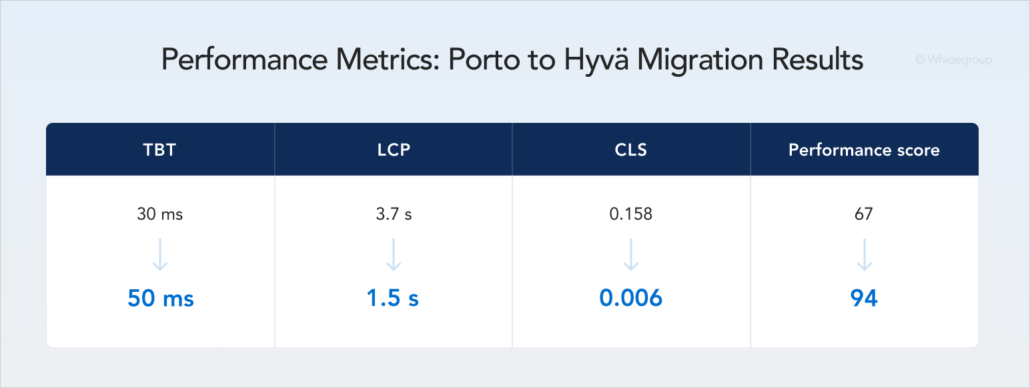
In this guide, Whidegroup experts explain when Hyvä migration makes sense, when it does not, and how to plan the switch with the right roadmap and development team.
Explore our Hyvä services and get a migration estimate tailored to your store.
Hyvä is a modern front end for Magento 2 that replaces heavy, outdated code with a lightweight technology stack. Merchants migrate Magento stores to the Hyvä theme to get sub-second load times, strong Google scores, and a faster way to build new features.
Luma-based Magento themes use heavy tools like RequireJS and Knockout.js. As a result, a single page can trigger more than 200 requests just to render basic content. Hyvä removes this overhead with two modern tools:
This shift led to reduced JavaScript payload and fewer browser requests per page. While a standard Luma site might take four seconds to load, Hyvä sites often load in under one second under comparable conditions.
Hyvä is not just another Magento front-end theme. It does not enforce a rigid layout structure. Instead, it provides a flexible foundation that allows teams to design storefronts without working around constraints.
By 2026, Hyvä has grown into a separate ecosystem within Magento. It includes the Hyvä Theme, UI Kit, Checkout, CMS, and Image Editor as stable releases. The Hyvä team also continues to build new products and shares these launch plans on their roadmap.
What is even better, in late 2025, the Hyvä Theme itself became free and open source. This change applies only to the theme. Hyvä Checkout and other modules remain paid, but they are optional. This lowered the entry barrier and made Hyvä accessible to a wider range of Magento businesses.
Today, more than seven thousand live stores use Hyvä. Below, we summarize the main reasons why Magento merchants choose Hyvä.
| Metric | Luma-based themes | Hyvä theme |
|---|---|---|
| HTTP Requests | ~230 per page | Under 50 per page |
| Avg. page load speed | 4 s | 1.2 s |
| Avg. page weight | 2–4 MB | Under 1 MB |
| Avg. mobile PageSpeed Insights score | 20–40 | 75–90 |
| CWV pass rate | 41% of stores | 65% of stores |
| Checkout speed | Baseline | 13x faster |
| Sales lift | Baseline | +15% to 30% |

Hyvä does improve speed and simplifies front-end development by reducing accumulated technical debt in the Luma theme. At the same time, retheming a complex, heavily customized Magento store requires significant time and budget. These efforts make sense only when front-end rebuilding aligns with broader business or technical goals.
We consistently point out one thing: if the only goal is to fix a slow website, start with a Magento performance audit before committing to a full front-end rebuild.
It’s also important to remember that Hyvä is a front-end layer. If your hosting can’t handle the back-end load or is configured incorrectly, changing the theme won’t fix these problems.
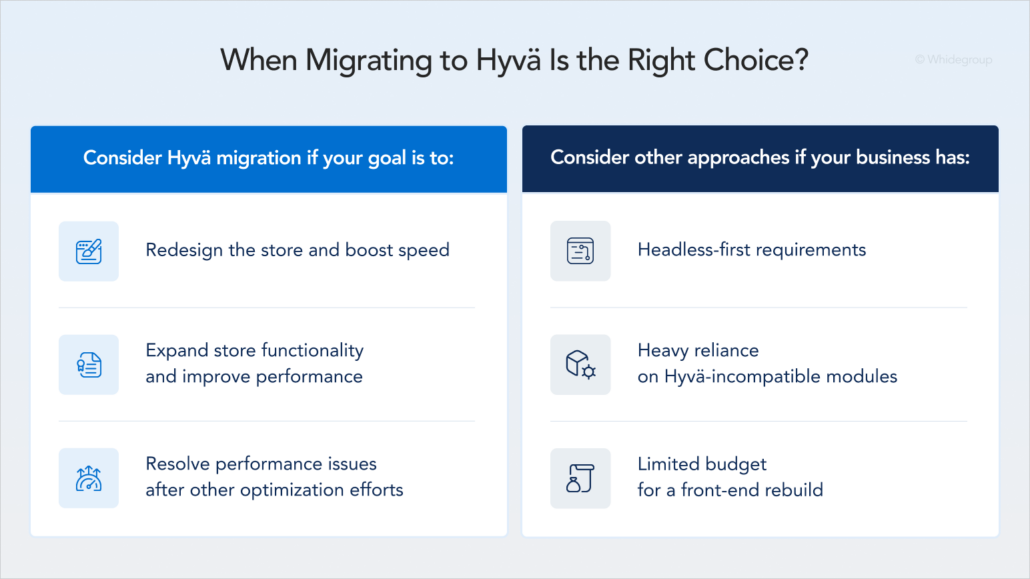
The right time for Hyvä theme implementation is when you already plan a major store change, such as a redesign or a functional upgrade.
Store redesign combined with speed optimization
If your storefront looks outdated and you plan a visual refresh, building a new design on top of Luma rarely makes sense. Creating a new design on Luma rarely delivers the best return on that investment.
Since design and front-end work are already planned, moving to Hyvä at the same time is more efficient. You deliver a refreshed storefront and address performance constraints within a single project.
Full store upgrade combined with performance goals
Your store may be scaling, business logic may be changing, or new functionality may be planned. In these cases, it is also the right moment to rethink the front end.
Instead of spending money to patch an old, slow theme, use that budget for Magento Hyvä migration. The new front end keeps your store fast, easier to manage, and aligned with your back-end architecture for years.
Performance optimization when all other actions were unsuccessful
In some cases, even experienced development teams cannot achieve acceptable speed on an old Magento front end. Before considering Hyvä migration, first review and optimize the main performance factors:
If page load times remain high after these improvements, the front-end theme may be the main limitation.
In this situation, Magento Hyvä migration becomes the practical way to reach stable performance and consistently pass Google’s CWV assessments.
Not every Magento store benefits equally from Hyvä. In some cases, sticking with your current setup or pursuing a different tech path makes more sense for your business.
Headless-first business requirements
Hyvä is designed to work within Magento and improve the traditional storefront model, while headless architectures use a completely separate front end. This separation benefits ecommerce businesses that need:
If your project depends on these features, consider a headless solution such as a PWA storefront. Compare Hyvä vs. PWA to weigh your functional requirements against development and maintenance costs before committing to a migration.
Heavy reliance on incompatible third-party extensions
Hyvä supports a wide range of Magento extensions. However, if your store relies on many niche modules that lack Hyvä compatibility, migration costs increase quickly.
Each such extension requires additional development work or a custom compatibility layer. If these modules cannot be replaced and rebuilding them is outside your budget, the Hyvä theme migration adds extra complexity.
Limited budget for a custom migration strategy
Migrating a Magento store to Hyvä involves rebuilding the front end, not a simple theme installation. If you expect a fast, low-cost theme swap, this approach will likely feel too complex. Meaningful results require a clear roadmap, technical expertise, and an investment aligned with long-term storefront goals.
Hyvä introduces a different way to build a Magento storefront. Here is what stays and what goes.
The good news is that you do not have to touch your database or admin panel. Your orders, customers, and product data remain safe:
Since Hyvä removes much of the complexity of the old Luma theme, your team must rebuild the parts of the storefront that customers interact with:
In short, Hyvä migration keeps the Magento engine in place but rebuilds the storefront around a lighter and more modern front-end architecture.
The Magento 2 Hyvä theme migration usually follows five core steps: audit, design recreation, implementation, testing, and launch. Below, we show how Whidegroup plans and manages the transition from audit to launch.
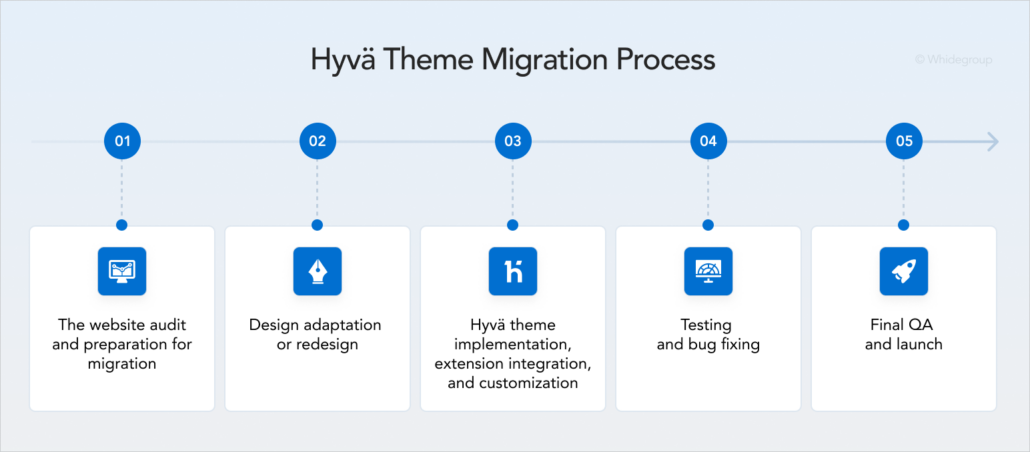
We start with a detailed front-end audit, where we identify all key aspects of your storefront, including:
Based on this audit, we provide a clear assessment of timelines and Hyvä migration cost.
Get a front-end audit with a realistic timeline and budget range.
There are two primary approaches to design recreation during the Hyvä theme migration.
Approach 1: Use Hyvä’s native capabilities, including the Hyvä UI Kit. This approach relies on Hyvä’s predesigned UI elements and layout principles.
Pros:
Cons: Your site will look different. Regular shoppers might need time to adjust, but a fresh, modern look is usually a top goal for this move.
Approach 2: Recreate the existing Luma design with planned UX improvements. This way preserves the familiar look of the current storefront while adding updates for UX enhancement and conversion rate optimization.
Pros: The storefront remains visually familiar to both internal teams and returning customers.
Cons: This option requires more time and a higher budget. Rewriting classic CSS-based styles into Tailwind utilities is a detailed and labor-intensive process. If maintaining visual continuity is a priority and the budget allows for it, this approach remains feasible.

At this stage, our developers rebuild the visual and interactive layer on the Hyvä stack. At the same time, specialists configure compatible extensions and adapt custom modules to work with the existing Magento back end.
Rebuilding layouts and components. In a staging environment, developers build storefront layouts based on Figma designs. Using Tailwind CSS, we create a lightweight HTML structure that browsers render quickly. We also replace legacy JavaScript logic with Alpine.js to handle filters, tabs, and dynamic pricing updates.
Extension integration. Hyvä-compatible extensions are installed and configured as part of the setup. For extensions that do not yet support Hyvä, two options are available:
This decision depends on the extension’s role in business operations.
Custom module adjustments. If your store includes custom-built features, developers rebuild their front-end layer using the Hyvä technology stack. Back-end business logic remains unchanged, while the visual and interactive components are adapted to the new front-end architecture.
After configuring the new Hyvä front end, we test and refine it in a staging environment.
Bug fixing. QA specialists validate all storefront functionality, including user flows and integrations. Developers then resolve identified issues before moving forward.
SEO validation. A storefront rebuild introduces SEO risks if transfer settings are transferred incorrectly. To protect existing rankings, our specialists always pay attention to the following:
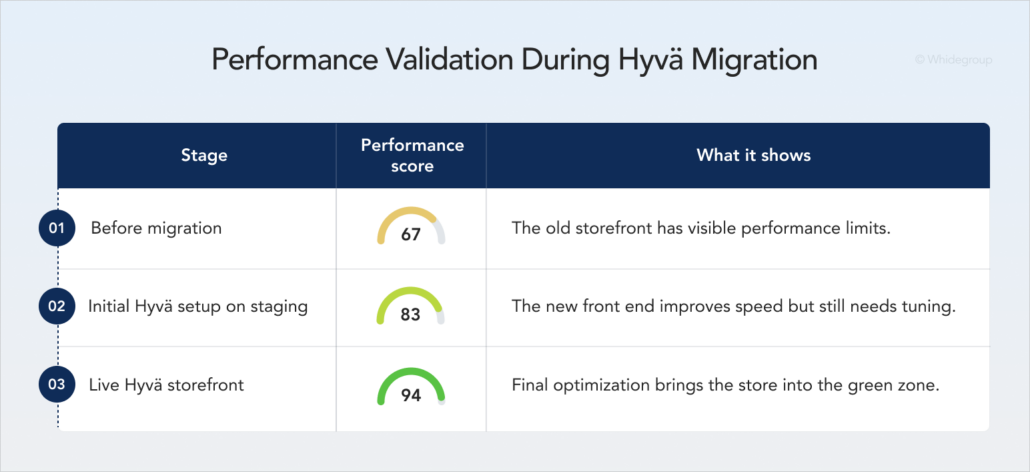
Performance and CWV checks. We compare the new Hyvä build against the existing storefront using the PageSpeed Insights (PSI) tool. Initial results may require further refinement. One or two additional performance-tuning iterations are common before reaching stable target metrics.
Our development team runs a full regression test across all critical user journeys, including product browsing, checkout, customer accounts, and integrations. We also validate responsive behavior across devices and browsers to ensure a consistent user experience.
After launch, our team monitors storefront stability, error logs, and performance metrics. This post-deployment support allows us to detect and resolve issues quickly under real traffic conditions.
Migration to the Hyvä theme delivers measurable improvements, but it also introduces risks. Treating migration as a simple theme replacement leads to delays and unexpected challenges. Fortunately, most risks are predictable, and experienced developers can address them early in the project. Below, we share the Whidegroup approach to handling the most common Hyvä-related challenges.
Since you are rebuilding the front end, you must account for every custom feature you have built over the years. If you miss some features during the planning stage, it can cause delays later.
Whidegroup approach: we start with a deep audit of your current site to list every feature that needs a rebuild.
Some design concepts look appealing but conflict with Hyvä’s performance-first approach. Complex animations or layout-heavy solutions designed without Tailwind CSS constraints slow down development and reduce page speed.
Whidegroup approach: our designers understand Magento front-end architecture and Hyvä capabilities. Developers collaborate with designers from the early stages to ensure design decisions remain compatible with Hyvä and support performance goals.
Extensions built for Luma do not work with Hyvä by default. If a store depends on niche or outdated extensions lacking Hyvä compatibility, functionality gaps appear after migration.
Whidegroup approach: we review the full extension stack during discovery. If an extension lacks Hyvä support, we recommend a compatible alternative or implement a custom integration.
Changing your front-end code changes how search engines see your site. If your in-house developers forget to move over your meta tags or schema data, your organic traffic will drop.
Whidegroup approach: we use an SEO checklist for every page and verify that all URLs and hidden data remain the same, keeping your rankings safe.
Сosts for Magento 2 Hyvä theme migration vary from store to store, but the main cost components are usually the same. The ranges below give you a starting point for planning, while the final estimate depends on your store’s complexity.
Key factors that increase migration cost include:
| Expense item | Price, $ |
|---|---|
| Existing website audit | 500 – 1,000 |
| Design updates (using your Figma files) | 1,200 – 4,500 |
| Full redesign | 2,500 – 6,400 |
| Hyvä installation & design implementation | 7,000 – 16,000 |
| Third-party extension integration (per extension) | 200 – 500 |
| Custom feature development | From 2,200 |
| Hyvä Checkout implementation | 1,500 – 4,000 |
| Total, $ | Starts from 10,000 |
Get a clear estimation for your Magento theme migration.
Use this checklist from Whidegroup specialists to get your team and your data ready for Magento Hyvä migration.
We put this checklist in a Google Sheet for you. Open the file and save a copy to get started.
Hyvä is not about chasing a new front-end trend. Magento store owners choose it to achieve real business goals: better conversion rates and lower long-term maintenance costs.
Still, Hyvä is not a universal solution. That’s why our role is to align Hyvä’s capabilities with how your store actually makes money. Talk to our Magento experts — we’ll review your current setup and provide a realistic cost and timeline or suggest another way for your ecommerce growth.
To help us prepare an accurate estimate, provide as much of the following information as possible:
• A list of custom features and functionality used in your store
• A list of third-party extensions and integrations
• The number of store views
• Information about your catalog size and complexity
• Your preferred design approach: recreating the current storefront or creating a new design
• Existing Figma files, design mockups, or brand guidelines (if available)
For the most reliable estimate, we also recommend providing access to your current store or a staging environment.
Yes. You can plan both as part of one project. However, we suggest you update to the latest Magento or Adobe Commerce first to isolate Magento upgrade issues from Hyvä compatibility problems.
Yes. You can use Hyvä for large stores on Magento Open Source. If you use Adobe Commerce or Cloud, Hyvä Enterprise adds support for B2B tools and other complex features.
Yes. Hyvä supports Magento multi-store and multi-language setups. Each store can share the same base code while keeping its own unique look, text, and local layout.


 Hyvä vs. PWA: What’s the Right Choice for Your Magento Store?