
 14 mins read


Website redesign for jewelry stores is never only about visuals. A new look must support the conversion flow, customer trust, SEO, and the technical needs of the store.
Brands that treat redesign as decoration risk making expensive ecommerce redesign mistakes. At Whidegroup, we’ve seen what happens when jewelry brands change the interface without considering the whole ecommerce system. Changes to the site structure can hurt search rankings, UX changes can increase abandonment, and redesigns combined with replatforming can break integrations or cause customer data loss.
We’ve also seen how careful planning helps businesses improve the customer experience and increase conversions.
In this guide, we explain common ecommerce redesign pitfalls and provide jewelry website UX best practices. You can use these tips with your internal team or to brief an external design partner.
Get an Ecommerce Redesign Backed by Technical Expertise
We align UX, performance, and development for your jewelry store upgrade.
Key Takeaways
Here, we summarize the key practices to help you plan a jewelry ecommerce redesign while protecting store performance:
- Align design updates with clear revenue and growth goals before changing visuals.
- Protect SEO, traffic, and conversion rates during redesign and replatforming.
- Remove friction in sizing, trust signals, navigation, and checkout flow.
- Rely on analytics, heatmaps, CRM insights, and customer feedback before making changes.
- Plan redirects, metadata transfer, structured data, and crawlability in advance.
- Optimize speed and Core Web Vitals (CWV) before launch.
- Ensure desktop and mobile journeys match in features and usability.
- Run QA, A/B tests, and post-launch monitoring to protect revenue.
- Work with a development team that understands jewelry-specific UX, SEO, and platform limits.
Why Jewelry Ecommerce Website Redesigns Carry High Risk
Redesign-related structural changes can disrupt customer journeys and hurt search visibility, ultimately reducing conversions and revenue. Due to possible data integrity issues, business risks are even higher when a redesign happens alongside a platform migration.
To avoid unnecessary losses, let’s look at the main threats jewelry brands need to consider before starting a redesign.
Redesign can increase purchase anxiety
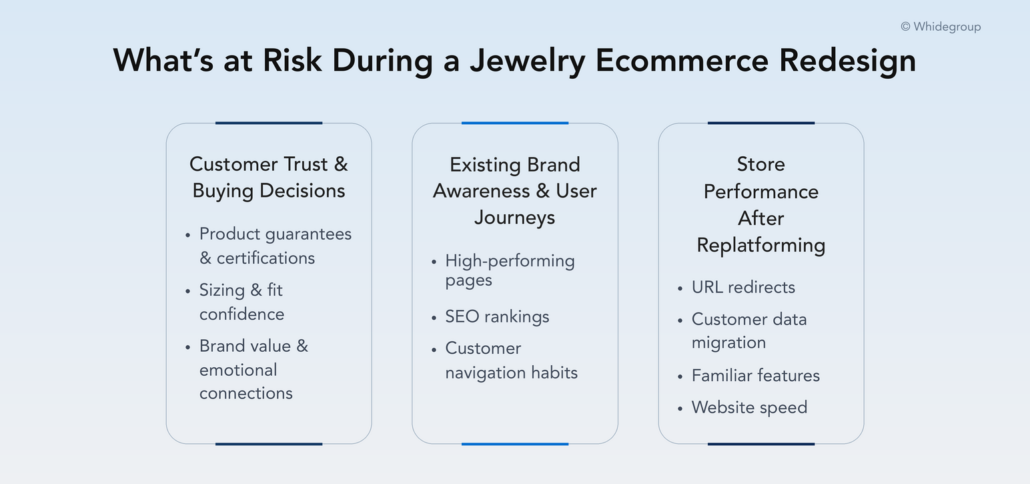
Jewelry ecommerce exists at the intersection of high-stakes rationality and intense emotion. To convert visitors into buyers, a site must overcome specific friction points.
- High product value. Customers need proof that the item will arrive safely and match its description. Potential buyers look for guarantees, certifications, secure payment methods, and transparent policies before completing a purchase.
- Sizing uncertainty. Most jewelry comes in multiple sizes. Buyers worry about fit, resizing options, and return conditions. Without clear guidance, hesitation increases and conversion drops.
- Intense competition. The market includes global brands such as Tiffany & Co., Pandora, and Blue Nile. In the lower-price segment, platforms like Temu and AliExpress compete on price and convenience. Your UX must clearly communicate why your brand offers better value.
- Emotional motivation. Jewelry often marks engagements, anniversaries, or personal milestones. Your website must support this emotional context while maintaining clarity and trust.
Discover more about

Redesign can damage what already brings traffic and revenue
Your store already has pages, features, rankings, and customer journeys that contribute to sales. Changes that ignore the existing value can hurt performance even when the new design looks great.
Before starting a redesign, check:
- High-performing pages. Before removing a page, check Google Analytics to see if it brings organic traffic and sales.
- SEO settings. Changing URLs or internal links without first creating a redirect map can lead to more 404 pages, which weaken rankings over time.
- Established customer journeys. Restructuring navigation, filters, or checkout steps that regular customers have grown used to can disrupt their buying patterns and increase cart abandonment.
- Existing features. Unclear or unexpected changes to tools customers rely on — wishlists, product comparisons, custom options — can reduce engagement and conversions instead of making shopping easier. Before changing a feature, review feedback from both customers and your store team.
Pairing design changes with replatforming adds complexity
Jewelry ecommerce website redesign often goes hand in hand with a store moving to another CMS. It’s strategically justified but creates additional risks of losing revenue:
- Missing URL redirect map. Without a structured 301 redirect plan, indexed pages disappear, rankings drop, and high-intent traffic declines.
- Customer data migration errors. Incomplete transfer of accounts, order history, wishlists, or customer balances damage trust and loyalty.
- Unstructured functionality changes. Removing or altering familiar features can increase abandonment from your most loyal segments.
- Insufficient performance optimization. New themes, heavy scripts, and uncompressed media slow page load speed, which directly affects conversion rates and paid traffic efficiency.
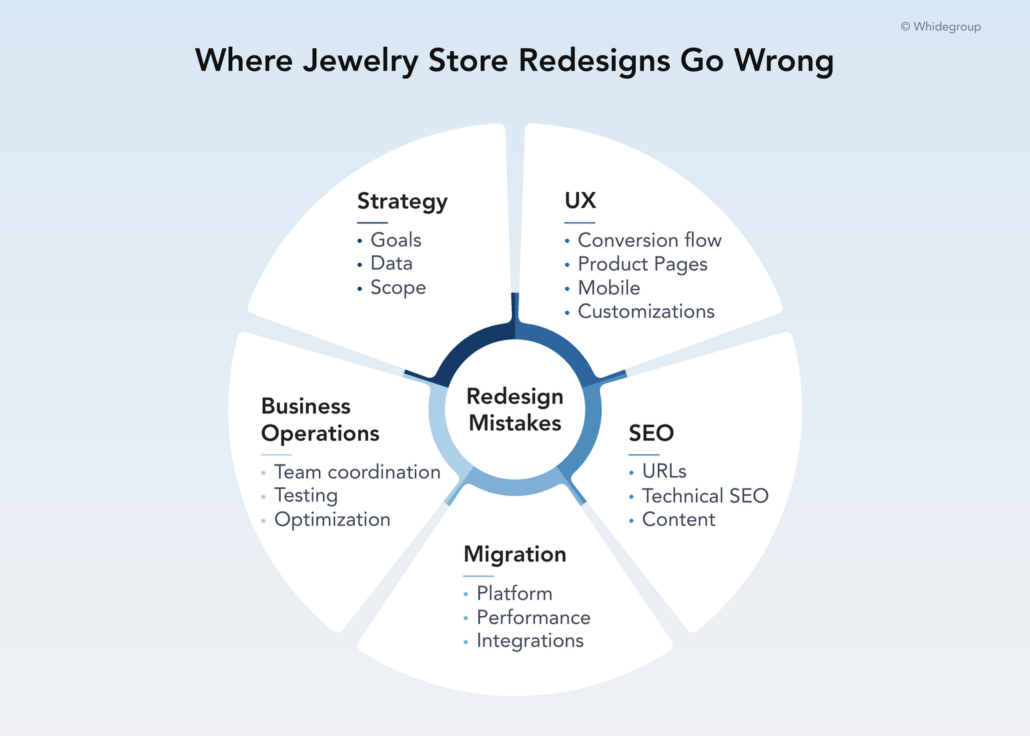
Understanding these risks is the first step; the next is to recognize what actually causes them. In the sections that follow, we’ll explain the common jewelry ecommerce redesign mistakes, focusing on strategy, UX, SEO, replatforming, and business operations.
Strategic Mistakes Before a Jewelry Ecommerce Redesign
Many redesign problems start with poor planning. Before briefing the design team, check the strategic decisions that can affect the project later.
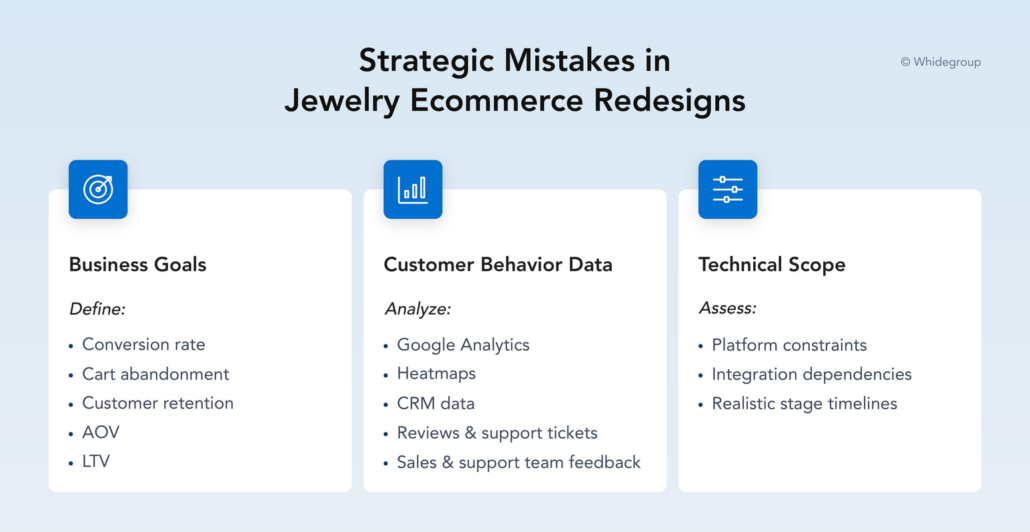
Starting redesign without clear business goals
Brands often start a redesign after rebranding, adding new features, or moving to another platform. Because these projects change the storefront appearance, the visual update can gradually become the goal itself.
A redesign needs a more specific business target: reducing size-related returns, making product comparison easier, improving mobile conversion, or solving another measurable problem. Otherwise, the store may look better without improving conversions or customer retention.
How to make sure your redesign supports business goals
Define the business outcomes before creating a design brief and set measurable KPIs for them:
- Conversion rate
- Cart abandonment
- Customer retention
- Average order value (AOV)
- Customer lifetime value (LTV)
Record the current metric values before the redesign, then compare them with post-launch results. This comparison shows whether the redesign improved the metrics it was meant to affect.
Ignoring data on how your customers shop
Design decisions should follow how customers actually use your site. Yet many redesigns skip this step relying more on the store team’s own preferences or general market reports. Industry research can help when you start an online jewelry business and have little store-specific data. An established business should start with its own analytics and customer feedback.
Analytics and support requests can reveal where shoppers hesitate: unclear sizing, missing details about metal or gemstones, or no visible certificates. Ignoring these signals can leave existing friction unresolved or remove pages and features customers already rely on.
How to ground redesign decisions in real customer data
Use your store’s data as the main source for a jewelry ecommerce website redesign. Pull insights from:
- Google Analytics: which pages lead to sales, and which cause drop-off.
- Heatmaps: where visitors spend time, and what they ignore.
- CRM data: repeat purchase patterns and customer segments.
- Reviews and support tickets: recurring questions or complaints.
- Sales and support team feedback: the doubts they hear most often.
Underestimating the technical complexity of redesign projects
Besides creating the design itself, implementation depends on the ecommerce platform, front-end integrations, website performance, and other factors. Jewelry stores are especially complex because they use live metal and stone pricing, engraving or customization tools, 360° product views, and certificate lookups.
A reliable estimate requires time to review these dependencies before development starts. If the scope is priced and scheduled too early, hidden technical work can lead to scope creep, delays, and higher development costs.
How to avoid time and budget gaps
Before signing off on a concept, confirm:
- Ecommerce platform constraints: what the new or existing CMS can and cannot support.
- Integration dependencies: ERP, PIM, CRM, payment gateways, and jewelry-specific tools such as pricing feeds, custom product configurators, and certification systems.
- Realistic timelines for each project stage: design creation, front-end implementation, quality assurance (QA), and performance optimization.
This upfront check helps you build a plan around the actual project scope and match your budget to your requirements.
Check the Plan Before the Project Starts
Clarify the real cost, scope, and risks before committing to a redesign.
Ecommerce UX Mistakes That Hurt Store Performance
Jewelry website UX best practices should make sizing, product details, and delivery information easy to find and understand. When these details are unclear, shoppers have more reasons to hesitate or abandon the purchase.
Designing for aesthetics instead of conversion flow
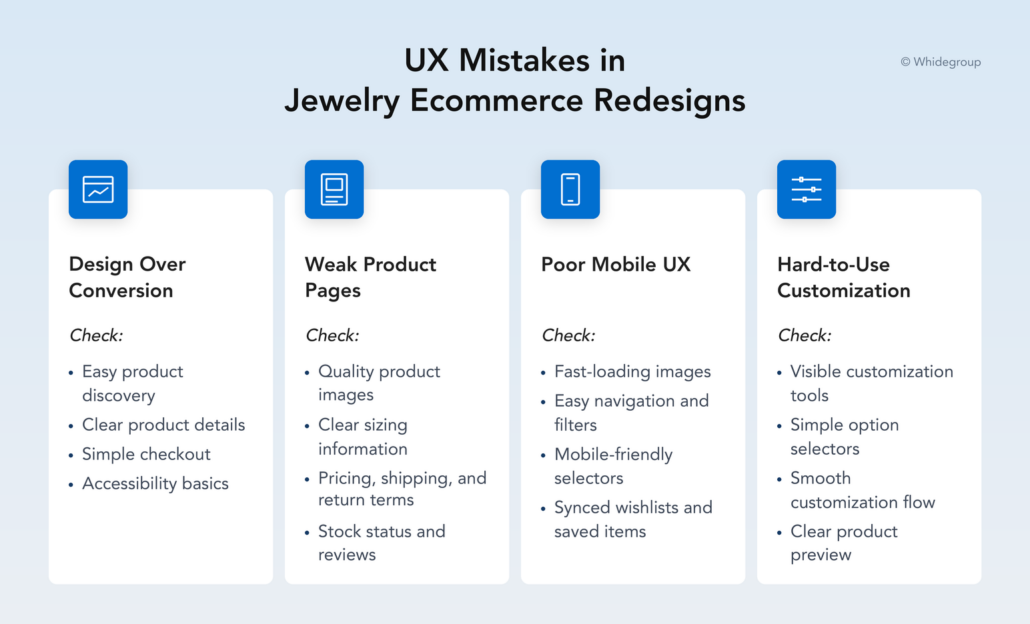
A redesign should improve the buying process. Can customers find a product, understand it, compare options, and complete a purchase more easily than before?
For jewelry brands, the website must help shoppers move from “I like this” to “I understand what I’m buying and trust this brand”. Common ecommerce UX mistakes that break this flow include:
- Unoptimized media. Large photos and videos can slow down product pages and interrupt browsing.
- Confusing navigation. Creative layouts can make products and categories harder to find.
- Overcomplicated checkout. Mandatory account registration, multi-step checkout, and excessive form fields increase abandonment rates.
- Distracting design elements. Oversized banners, pop-ups, or animations often compete with product content and CTAs.
- Poor accessibility. Low contrast, small text, or no keyboard navigation make the store harder to use.
How to keep design focused on conversion
- Test the new design against key customer tasks: finding a product, understanding its details, comparing options, and completing a purchase.
- Compare the new flow with the current one to see whether it adds extra steps or removes useful information.
- After launch, use analytics, usability testing, and A/B testing to identify new friction points.
Weak product page optimization
A product page should resolve the questions that can delay a purchase: what the customer is buying, how it will fit, when it will arrive, and what the return conditions are. Missing or unclear information can push shoppers to look elsewhere.
For jewelry, product presentation carries even more weight because customers cannot examine or try on the piece before buying. Photos, videos, and detailed specifications have to close that gap.
How to build a product page that removes doubt
Check that the product page includes:
- High-quality photos, lifestyle shots, and zoom or 360° views
- Full material and gemstone details, plus certification where relevant
- Clear sizing guidance
- Transparent pricing, shipping, and return terms
- Stock status
- Customer reviews, ratings, and real customer photos where available
Neglecting mobile experience
Mobile shoppers should be able to complete the same key tasks as desktop users. When mobile is treated as a later adaptation, teams often end up with missing filters, less intuitive navigation, or features such as Save for Later that do not work properly.
Customers still need to inspect product images, select sizes, and use customization options easily on mobile. If these functions are harder to use or unavailable, shoppers may abandon the purchase.
How to keep the mobile experience user-friendly
Check that mobile users get the same core experience as desktop users:
- Fast-loading zoom and photo views
- Clear navigation that keeps important categories accessible
- Filters and sorting options
- Mobile-friendly size, metal, and engraving selectors
- Saved items or wishlists synced across devices
Making customization hard to use
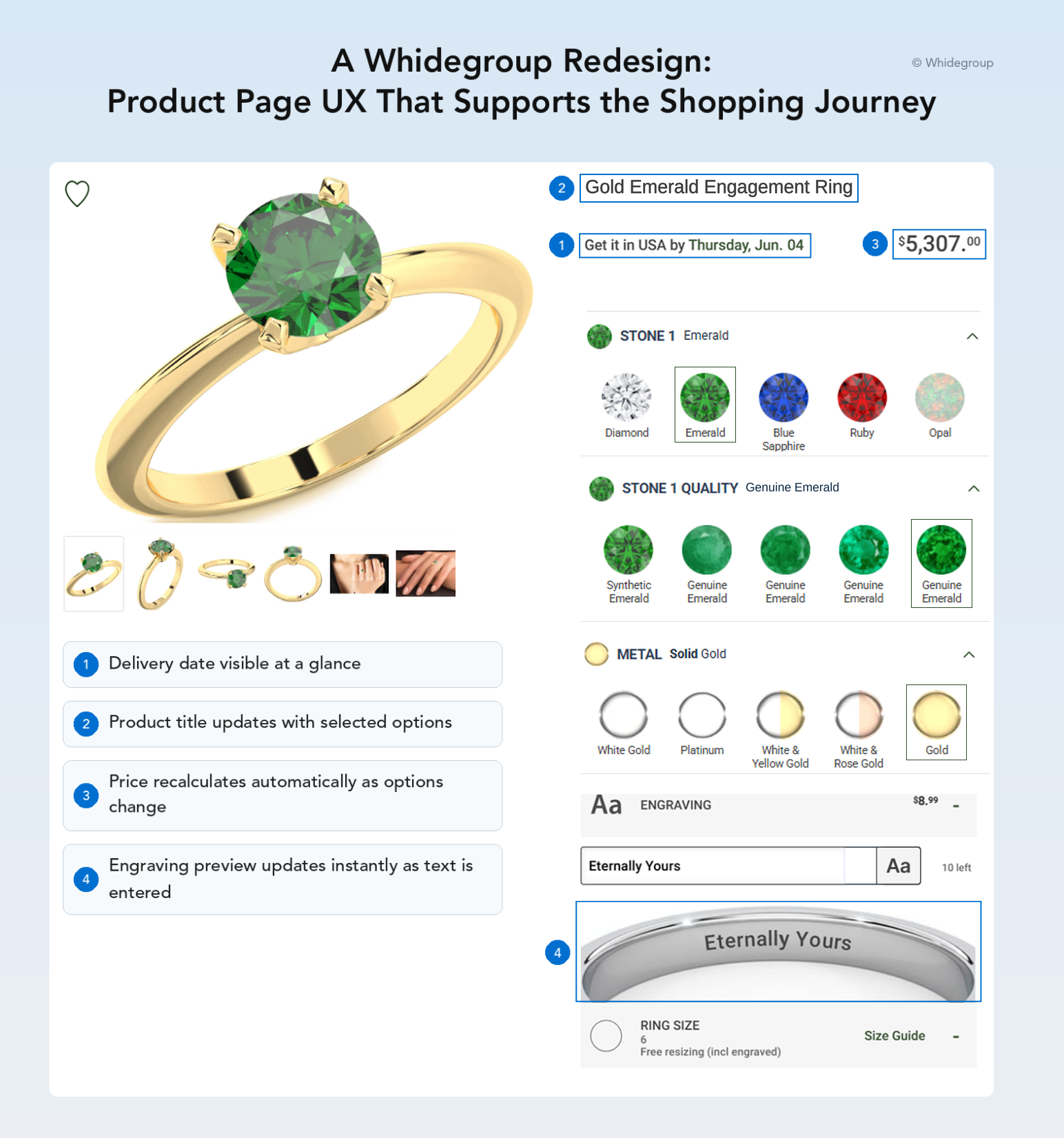
Customization can help jewelry shoppers create a piece that better matches their preferences, from engraving to size and material choices. But these options only add value when customers can find and use them easily.
A confusing configurator, hidden engraving options, or awkward size and material selectors can interrupt the buying process and reduce the value of the custom functionality you invested in.
How to make customization easy to find and use
- Test configurators and engraving tools with real users.
- Keep customization options visible and easy to access.
- Integrate size, material, and gemstone selection into the buying flow.
- Show a clear preview of the customized result before purchase.
In our case study, you’ll find a working example of a jewelry product customizer that helped our client increase sales.
SEO Mistakes That Hurt Jewelry Store Visibility
Changes to URLs, site structure, content, and technical settings can affect pages that already rank and bring organic traffic. That’s why, during a jewelry ecommerce website redesign, it’s essential to plan your SEO strategy before launching the updated storefront.
Breaking URL structure and redirect logic
Among the most common ecommerce redesign pitfalls is changing or removing URLs without a proper redirect plan.
If an existing URL disappears without a redirect, the replacement page can lose organic visibility and traffic. This issue often happens when jewelry brands reorganize their site structure. A company may move “/fine-jewelry/rings” to “/rings/gold”, for example, or regroup products by gemstone, metal, or collection. Since category pages often carry SEO value, losing their URLs can weaken organic rankings.
Broken URLs can also waste paid traffic. Shoppers who click an ad or affiliate link may land on a 404 page and leave before reaching the intended product or category page.
How to preserve URL value
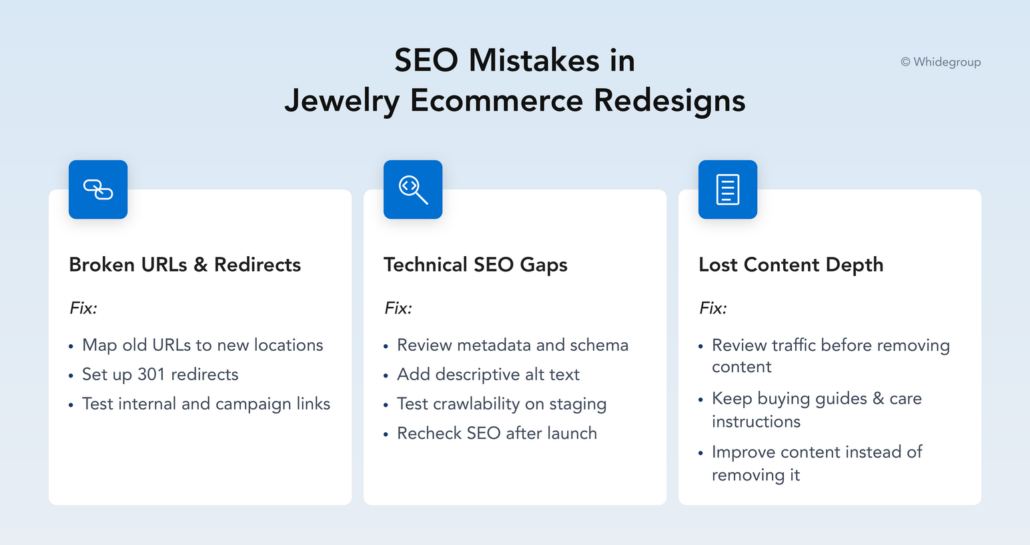
- Create a redirect map for all changed or removed URLs.
- Point each old URL to the most relevant new destination using a 301 redirect.
- Test internal links, paid campaigns, affiliate links, and other external traffic sources.
Ignoring technical SEO during jewelry ecommerce website redesign
Technical SEO errors introduced during a redesign can make it harder for search engines to crawl or index important product and category pages. Because these elements are mostly invisible in the storefront, they are easy to miss during design and development.
Check for:
- Site structure changes. New category hierarchies, internal links, or filtering logic can bury important pages or weaken their internal linking.
- Lost metadata and structured data. New templates can accidentally drop metadata or schema markup for product prices, availability, reviews, and other details.
- Outdated or missing alt text. Product images should have descriptive alt text, such as “14k gold oval engagement ring”.
- Crawlability and indexing issues. Leftover noindex tags, incorrect robots.txt rules, broken canonicals, or heavy JavaScript rendering can keep important pages out of the index.
How to protect SEO settings
Involve an SEO specialist throughout the redesign and audit the new site before and after launch:
- Review site structure, metadata, structured data, canonical tags, robots.txt, and indexing rules on staging.
- Fix any issues before the new site goes live.
- Recheck the same SEO elements after launch.
Losing content authority and landing page performance
Redesigns can simplify content to make it look cleaner: shorter pages, less text, more visuals. If useful information disappears, the page may no longer cover the search intent as fully as before.
Cutting out detailed info hits jewelry sites in a specific spot. Category and guide content, such as diamond clarity explainers, ring-buying guides, care instructions, tends to earn backlinks and rank well over time. Removing these pages or cutting key sections may weaken existing organic performance.
How to preserve content value
Before rewriting or removing content, compare landing pages using organic traffic, rankings, conversions, and engagement data. Keep content that supports search visibility or purchase decisions. If a section needs improvement, update it; don’t remove it solely to make the page look cleaner.
Ecommerce Replatforming Mistakes
A jewelry ecommerce website redesign often coincides with a CMS migration or front-end theme change, increasing the number of things that can go wrong during implementation.
Choosing a platform that limits your future growth
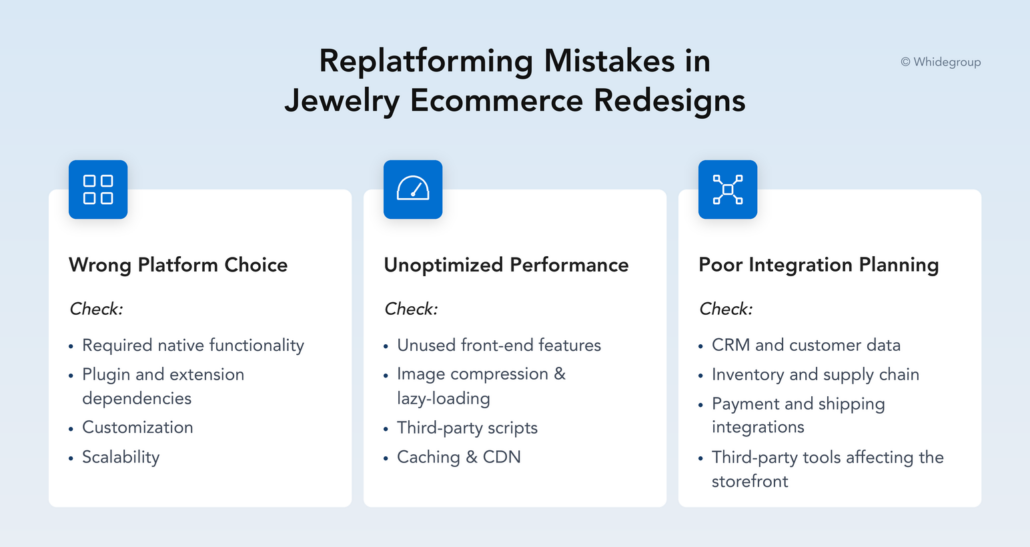
An ecommerce platform that works for your jewelry store today may become limiting as the business grows. Before the redesign starts, check how well the platform can support a larger catalog, new integrations, custom features, and expansion into new markets. Common limitations include:
- Performance limits: large catalogs, high-resolution media, traffic spikes, or complex pricing logic can strain the platform.
- Scalability issues: limited support for multiple stores, currencies, regions, or localized content.
- Customization barriers: restricted control over checkout, product configurators, advanced filters, or other jewelry-specific features.
- Integration limits: poor compatibility with ERP, PIM, CRM, marketing tools, or custom systems.
- Plugin dependency: missing native features that increase reliance on third-party apps and maintenance overhead.
How to choose a platform that fits your requirements
Follow these steps before selecting a platform:
- Define current and future needs. Document catalog size, product complexity, customization options, integrations, international expansion plans, and expected traffic.
- Compare platform capabilities. Check which requirements the platform supports natively, which require custom development, and which depend on third-party extensions.
- Estimate long-term effort. Consider development, maintenance, extension costs, performance limits, and the effort required to scale the store as your business grows.

Ignoring performance optimization
Jewelry stores rely on rich product media to help shoppers inspect details before buying. If these assets are not optimized, they can slow page loads and worsen CWV. Poor performance can hurt conversions, mobile UX, organic visibility, and paid traffic efficiency.
How to keep rich visuals fast
- Optimize media. Compress images and videos and lazy-load them where appropriate.
- Audit third-party scripts. Remove unnecessary scripts and limit those that add significant load time.
- Choose a lightweight theme. Avoid heavy built-in features that your store doesn’t use.
- Set up caching and a CDN. Improve content delivery and reduce load times across regions.
Poor integration planning across external tools
Jewelry ecommerce relies on stable data exchange between the storefront and external systems. During a redesign, changes to the interface or platform can affect these integrations. If dependencies are not mapped and tested in advance, the new storefront may display incorrect data or break important business processes.
Common problem areas include:
- Inventory and supply chain sync. If ERP or PIM data does not sync correctly, shoppers may see outdated stock levels, incorrect prices, or unavailable product variations.
- Payment and shipping gaps. Tax, duty, and shipping errors can interrupt checkout, show the wrong total, or display inaccurate delivery timelines.
- CRM and customer data failures. Problems with accounts, saved preferences, loyalty points, or purchase history can interfere with personalization and repeat-purchase flows.
How to plan integrations that hold up after migration
- Map all system dependencies before development starts.
- Define what data each integration sends and receives, then test critical data flows on staging before launch.
- Pay particular attention to inventory, pricing, product options, customer accounts, payments, shipping, and order data.
Planning a Redesign and Migration together?

Operational Mistakes in Jewelry Ecommerce Redesign Projects
A well-planned redesign can still fall short if coordination and launch management are overlooked. Different teams may have different priorities, while tight deadlines can lead to skipped checks or rushed decisions.
This section covers the operational mistakes around launch that sit outside design and development itself.
Lack of cross-team coordination
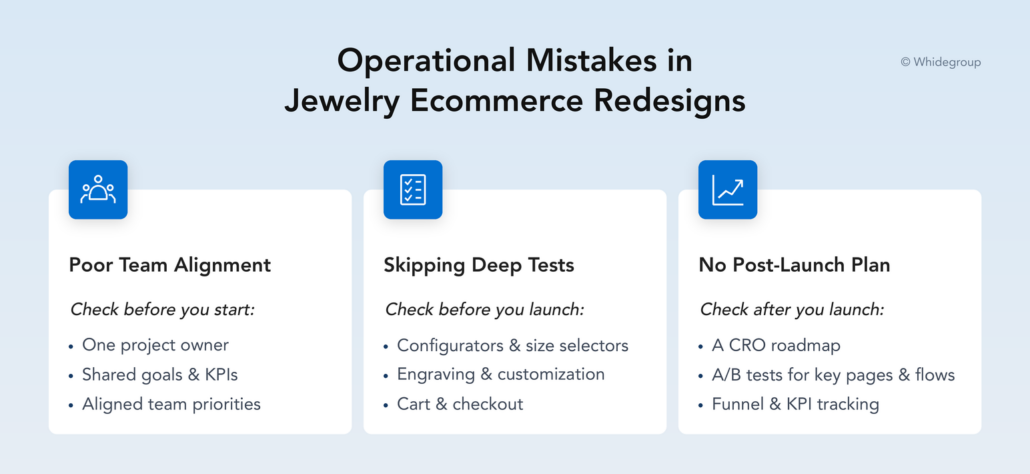
Marketing, development, and sales often have different priorities for the redesigned store. One team may push for richer visuals and campaign features, while another needs reliable integrations, performance, or easier maintenance.
Without shared business goals, the approved design can create conflicts later in development or lead to additional changes after launch.
How to keep teams aligned during redesign
- Assign one owner to set priorities and resolve conflicts.
- Agree on shared goals and KPIs before design work starts.
- Review major design decisions with the teams they affect before approval.
Skipping thorough testing before launch
For jewelry stores that use complex product configurators, size selectors, and customization features, fast testing can leave bugs that appear only after launch and hurt conversions.
How to catch issues on time
- Test critical purchase paths in staging. Cover configurators, sizing, engraving, checkout, and payment flows.
- Test different scenarios. Use multiple devices, browsers, product variations, and customization options.
- Do not launch with critical flows unverified. Move the launch date if necessary.
Launching without a plan for future optimization
Post-launch data may reveal friction that was not obvious during design, such as where shoppers hesitate over sizing, drop off during configuration, or abandon checkout at a specific step.
Your jewelry marketing strategy and on-site conversion logic should evolve as customer behavior changes, so optimization needs to continue after launch.
How to keep improving after launch.
- Set a conversion rate optimization (CRO) roadmap.
- Run A/B tests on key pages and flows: product pages, configurators, and checkout.
- Track funnel and KPI data regularly to spot new friction points early.
Final Thoughts
A jewelry ecommerce redesign can improve the store, but it can also affect parts that already work well: customer flows, search visibility, integrations, and platform logic. Understanding these dependencies early makes it easier to plan the project around the store as a whole.
This combination of design and technical work is familiar territory for Whidegroup. We can start with an audit of your current store, identify the main redesign risks, and help define the next steps. Contact us to talk through your project.
How long does a jewelry ecommerce redesign usually take?
A full redesign project takes three to six months. Simple theme updates may take up to eight weeks, while custom builds with complex jewelry tools (like engraving previews or ring builders) often take longer.
How much does ecommerce redesign typically cost?
Costs vary based on platform, design depth, integrations, and technical complexity. Our projects usually range from $2,500 to $7,000. Accurate estimates require a technical audit and feature mapping.
How do you test ecommerce redesign before launch?
We test redesigned stores in a staging environment, typically including the following aspects:
• Functionality: navigation, product pages, filters, forms, checkout, and customization features.
• Cross-device compatibility: user experience across major browsers and mobile devices.
• Integrations: data exchange with ERP, PIM, CRM, payment, shipping, and other connected systems.
• Performance: page speed and Core Web Vitals.
• SEO: URLs, redirects, metadata, structured data, canonical tags, and indexing rules.
• User journeys: key shopping journeys from product discovery to payment.
How do I choose the right ecommerce redesign partner?
Choose a company that understands both ecommerce design and the technical risks of redesign. To evaluate potential partners, follow these steps:
1. Review relevant case studies. Look for projects involving jewelry, luxury, or other high-ticket products.
2. Check technical expertise. Confirm experience with your ecommerce platform, integrations, and performance optimization.
3. Ask about the redesign process. Make sure the partner covers discovery, UX, development, testing, migration (if it is relevant for your goals), and post-launch optimization.
4. Clarify communication and scope. Make sure responsibilities, deliverables, timelines, and change management are clearly defined.
5. Check post-launch support. Confirm how the team will monitor performance and fix issues after launch.
How does Whidegroup mitigate traffic and revenue loss?
Whidegroup reduces redesign risks at each stage of the project:
• Before development. The project starts with an audit of the existing store, SEO settings, integrations, performance, and business requirements to catch potential problems before they reach development.
• Before launch. We test functionality and performance in staging, where problems can be fixed before the store goes live. The release is scheduled during off-peak hours to reduce disruption to active shoppers and orders.
• After launch. Our team includes up to two months of free support to address issues found on the live store.
About the author

Anastasia is a Co-founder and the Business Development Director at Whidegroup with a decade of experience in ecommerce consulting and project management for small and medium-sized enterprises. Competent both in the business and technical side of ecommerce projects, her projects have been widely-distributed internationally. Anastasia is dedicated to providing clients and partners with tailored development solutions for their ecommerce businesses.




The most useful redesign improvements target customer hesitation. Where do people stop? Which product details do they check twice? What makes them contact support instead of buying? Which pages bring traffic that we cannot afford to lose? When these questions are answered, the visual direction becomes much safer. Anastasia Zhuk, Co-Founder and Ecommerce Consultant at Whidegroup