Magento 2 Data Migration Guide:
Tools, Limits, and Best Migration Strategy
 13 mins read

Magento 2 Data Migration Guide:
Tools, Limits, and Best Migration Strategy
13 mins readA merchant decided to migrate his store using Magento 2 data migration tools that promised a fast, trouble-free process. Eventually, the launch was delayed by a month to resolve issues missed during migration. Why?
Ready-made Magento 2 migration tools can help you save time, but they are not a complete solution. They will not build a store from scratch or execute every setup task. Migration includes multiple stages, and data transfer is only one of them.
In addition, these tools come with limitations. If your store has a complex structure – custom features and large catalogs with thousands of products – they fail or require significant adjustments.
This tutorial explains when and how to use Magento data migration tools, and what to do when ready-made software cannot address your specific requirements.
Whidegroup specialists manage complex Magento migrations, including custom functionality and integrations.
Magento data migration means moving store information from your current platform into Magento 2, including products, customers, orders, and key configurations.
This process is not a simple copy-paste task. Several technical factors make it complex:
A real example comes from a project where we migrated data from Magento 1 to Magento 2 for the furniture retailer Kjellmann. Since we already provided their Magento 1 store support services, we knew the technical debt. The store had over 20 extensions, custom ERP integration, and business-specific logic that could not be transferred as-is.
This project took 450 hours of work that paid off with measured business results:

Standard tools handled only part of the data migration. Whidegroup team had to rebuild custom code from scratch and carefully select which extensions to keep. Then they run a two-stage migration with a final delta sync to avoid losing recent orders and updates.
Therefore, you need to understand how to transform your current data structure and replicate existing features. Without this context, your new Magento 2 store may appear to work at first but later reveal issues such as lost orders, missing data, or reduced customer trust.
To plan migration properly, you first need to know which data types should be migrated.
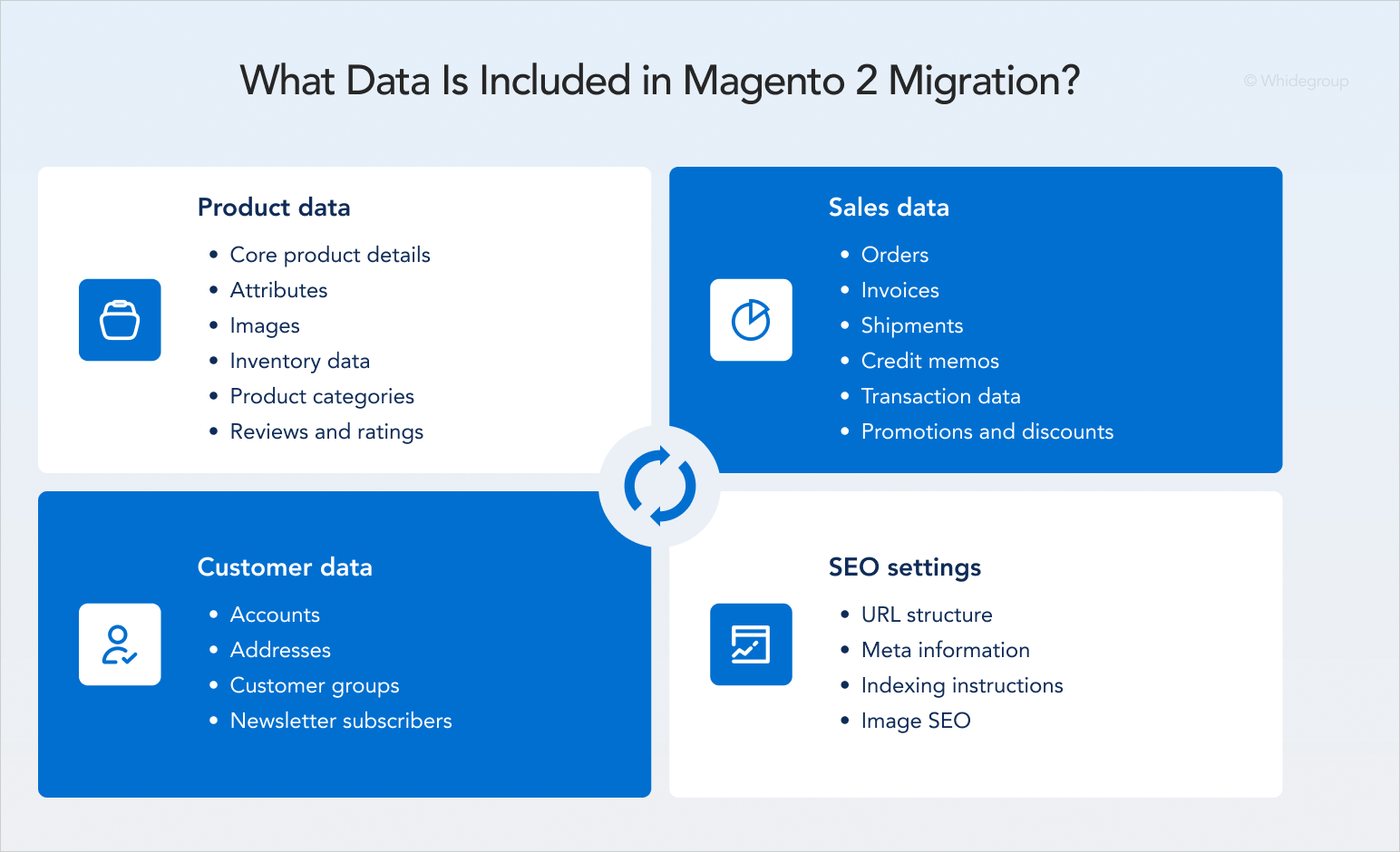
Product data migration to Magento 2 includes the following:
Accurate product data forms a logical network that supports front-end functionality, such as search, filters, and inventory levels.
Customers
Magento database migration for client data includes:
This data affects logistics automation, personalized pricing, and, what is vital for ecommerce business, customer retention marketing campaigns.
Sales data
Sales data represents the financial and legal history of your business:
SEO settings
Properly migrated SEO data helps reduce the risk of traffic loss after migration. To preserve organic visibility, you need to transfer and validate:
These lists show how much data must be accounted for during migration. The more complex your current store structure, the more edge cases will emerge. The level of complexity directly determines whether you need professional Magento 2 data migration services beyond standard tools.uch easier. You can use the checklist above as a hint for successful migration, which will not let you forget any important step.
A pre-migration audit is a way to measure your store’s complexity, helping you understand if a standard migration tool can cover your data.
During the audit we recommend paying attention to:
These checks determine your next steps. If your audit reveals simple data structures and no custom logic, a standard tool will work. If your business depends on heavy customizations and real-time data sync, you should not rely on automated tools alone.
In 2026, there are two widely used tools that facilitate shifts from platforms like Shopify, Wix, BigCommerce, and even Magento 1 to 2 data migration. They offer similar capabilities and differ slightly in pricing. You can test demo versions of both before choosing. Or understand that neither is suitable due to their limitations.
The tools handle most of the migration if your website has:
You can still use Magento 2 migration tools for more complex stores. You just should realize that they cover only one stage of the overall migration process.
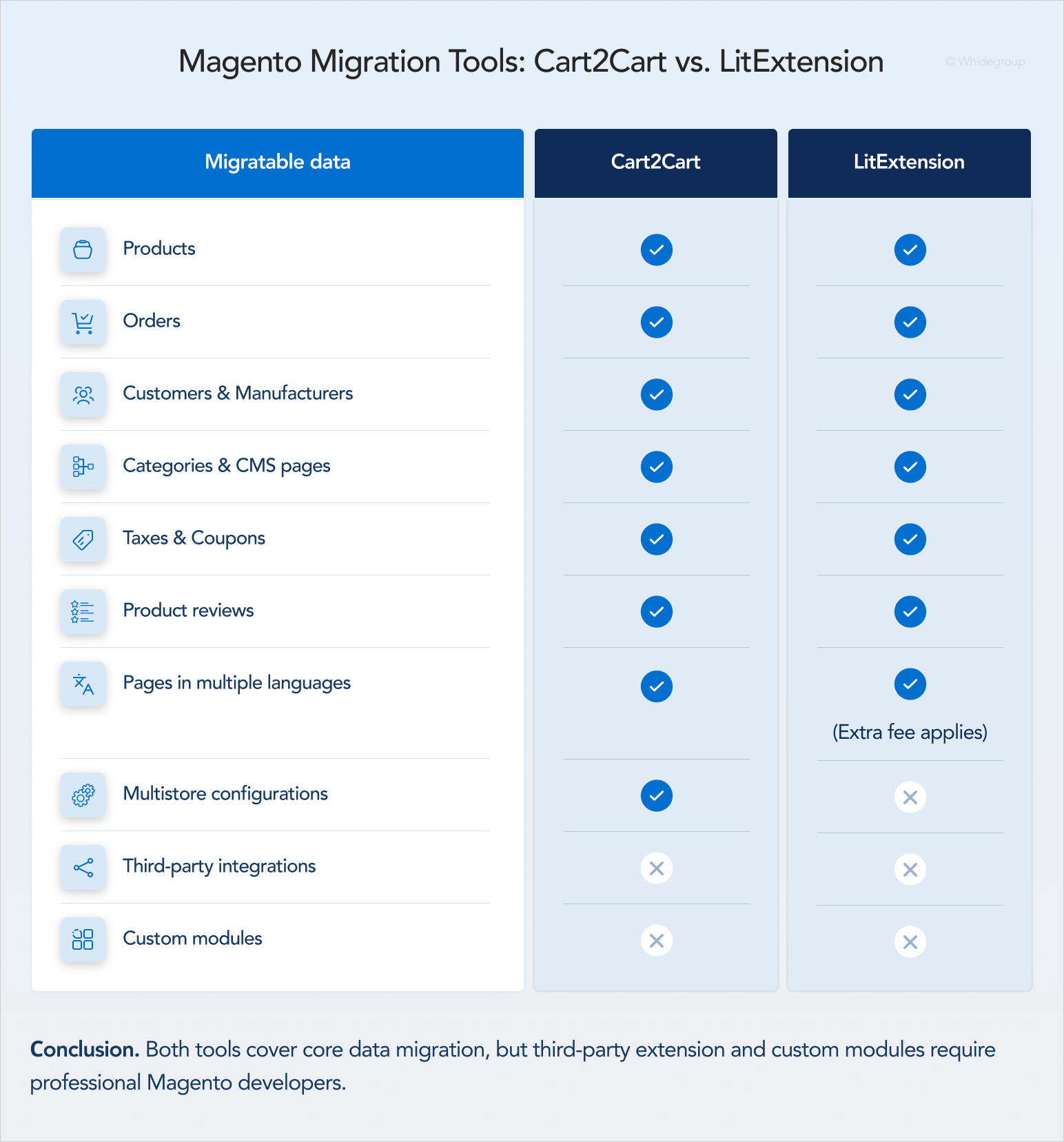
Cart2Cart is the oldest service on the market that currently offers migration from more than 90 platforms.
Capabilities. The service supports the transfer of products, customers, orders, SEO settings, CMS pages, and more. The company states it can also migrate multe-store and multe-language setups. You can filter specific data sets and map fields manually.
Limitations. The tool struggles with complex delta migrations, where data changes frequently during the development cycle. It also cannot replicate custom-built features or theme-specific logic.
Cart2Cart uses a pay-per-volume pricing model. The cost depends on the number of products, customers, and orders. If your database is large, the cost rises quickly.
LitExtension supports over 140 ecommerce platforms and provides a guided interface for the transfer process.
Capabilities. Just like Cart2Cart, this tool offers a migration of products, customers, orders, but it does not mention multi-store migration support for Magento stores. Transferring data in multiple languages requires additional fees.
Limitations. Complex migrations require additional checks and manual corrections after the transfer.
LitExtension is a direct competitor to Cart2Cart and offers better pricing for large-scale projects. As a result, it can be more cost-effective for migrating large volumes of data.
These and similar services simplify migration efforts and address simple Magento 2 database migration effectively. If your shop’s structure is unique, they can still complete a portion of the task. However, migration tools often require comprehensive post-migration checks and further manual corrections.
The Magento Data Migration Tool is a command-line interface (CLI) solution designed specifically for the Magento 1 to Magento 2 migration process.
Key features:
Technical limitations:
Quick summary
The native Magento 1 to Magento 2 data migration extension is the best solution that ensures a high-quality migration. You need Magento experts to make it work, but a mixed manual-plus-tool approach is the most reliable option. In this way, you preserve complex logic and your entire database.
Is it necessary in your case? Migration without this tool is possible, but most Magento 1 projects require manual corrections. We base this on our experience migrating over 20 highly-customized stores to Magento 2. Contact us for a free consultation, and we’ll help you choose the most effective way for your migration project.
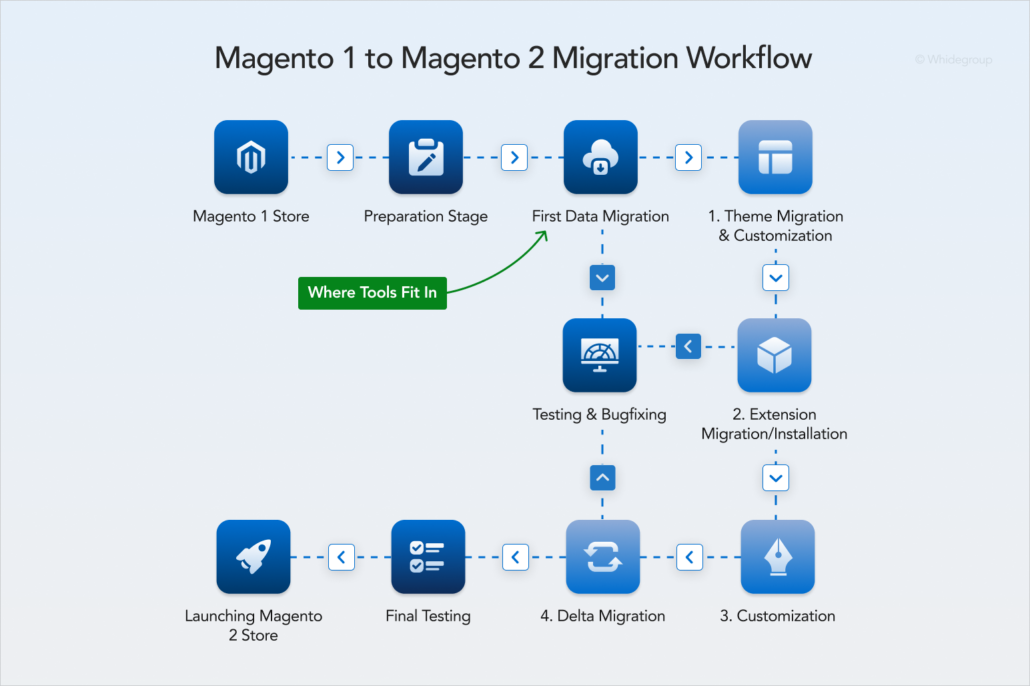
Magento 2 migration tools speed up data transfer, but they do not automate the full process. You still need to configure mappings, control each stage, and validate results. This logic applies whether you migrate from Magento 1 or any other platform.
Below is how migration to Magento 2 typically works.
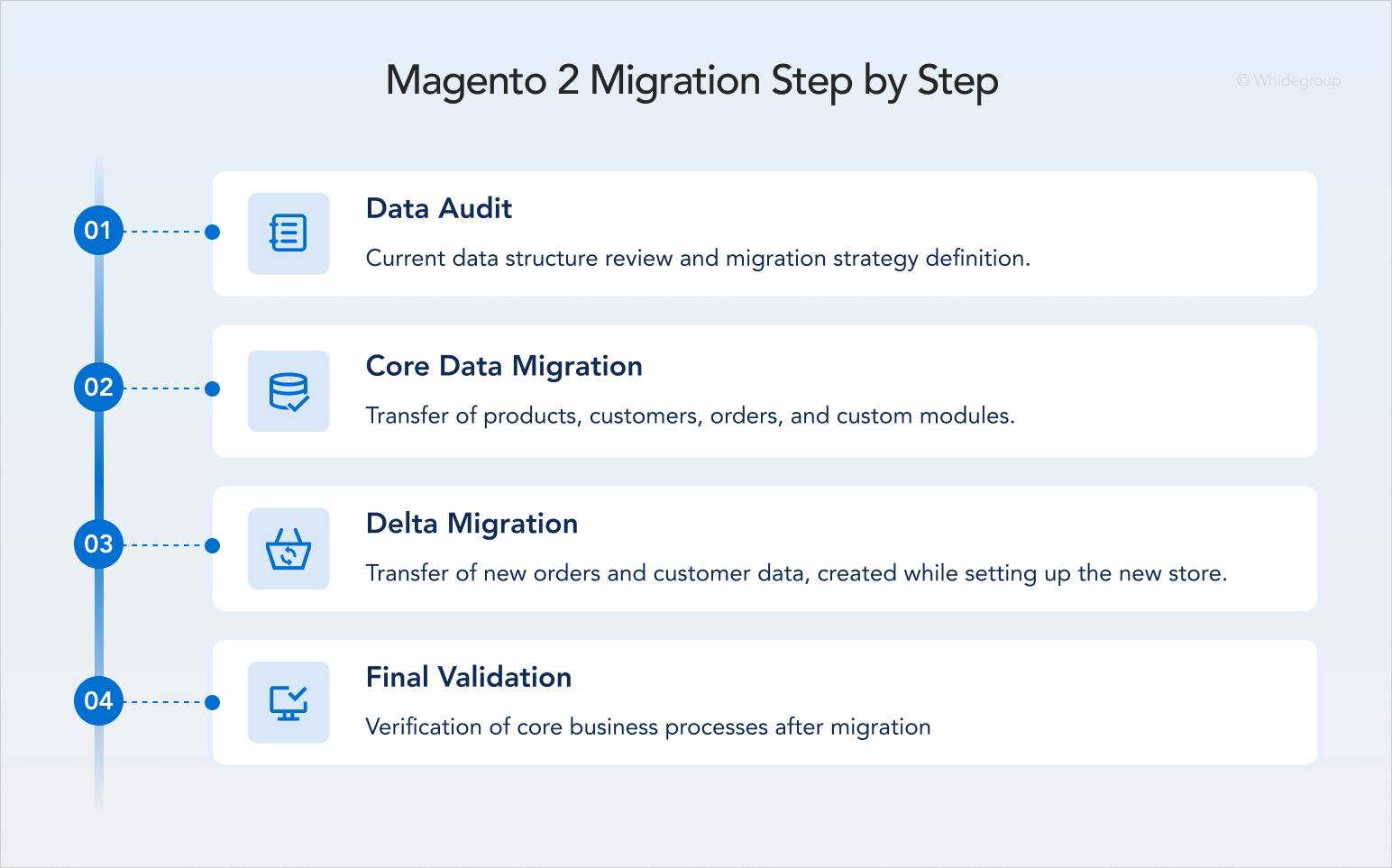
You analyze your current data structure and define how it will translate into Magento 2.
There are two critical points here:
In our practice, a client has come to us after attempting automated migration. They assumed the process would be straightforward, but it didn’t. During transfer, the tool failed to link thousands of orders to customer accounts and lost custom product attributes, including size and color data.
As a result, the project had to be restarted from scratch. Instead of saving resources, the client spent more time, effort, and budget than if they had engaged professional Magento developers from the start.
Here comes the most complex phase of the project.
First, you migrate products, categories, customers, and orders using your chosen tool.
Critical points. Preserving relationships between the source and target databases, and correctly aligning attributes with Magento’s EAV structure.
Next, you manually migrate third-party and custom functionality. In practice, this migration means selecting suitable Magento 2 extensions and integrating them, or developing custom modules. In either case, you need the help of the expert Magento team.
We rebuild your existing integrations and connect them with your new Magento 2 store.
After the main data transfer, your new store needs to be configured and all functions must be tested. During this time, the Magento 2 site remains invisible to users. Consequently, your current store must remain active to allow customers to place orders, new users to create accounts, and your team to update products. These operations create a gap between the data already migrated to Magento 2 and the latest data still appearing in a Magento 1 database.
Delta migration closes this gap by synchronizing recent changes before launch. The goal is to bring the new Magento 2 store up to date without duplicating records that were already migrated.
Critical point. Accurate transfer of new data without duplicating information migrated in the previous step.
After migration, your team should verify core business processes. Here are the aspects that Whidegroup specialists test:
Critical points. Unoptimized data structures and third-party extension conflicts that require a professional Magento development team to resolve.
Whidegroup developers first verify core features, then test custom modules and integrations. We disable extensions one by one to identify the modules causing problems. Then we debug the affected modules and fix or customize them to ensure proper functionality.
To conclude this section: even with a structured step-by-step approach, after migrating to Magento 2, projects with complex data models, custom features, or external integrations often face post-launch issues.
Post-migration issues happen in complex projects, but they are more likely and more severe when migration relies only on automated tools. These issues are not random. They result from broken data relationships, misaligned configurations, or incomplete integrations that tools cannot recreate and validate.
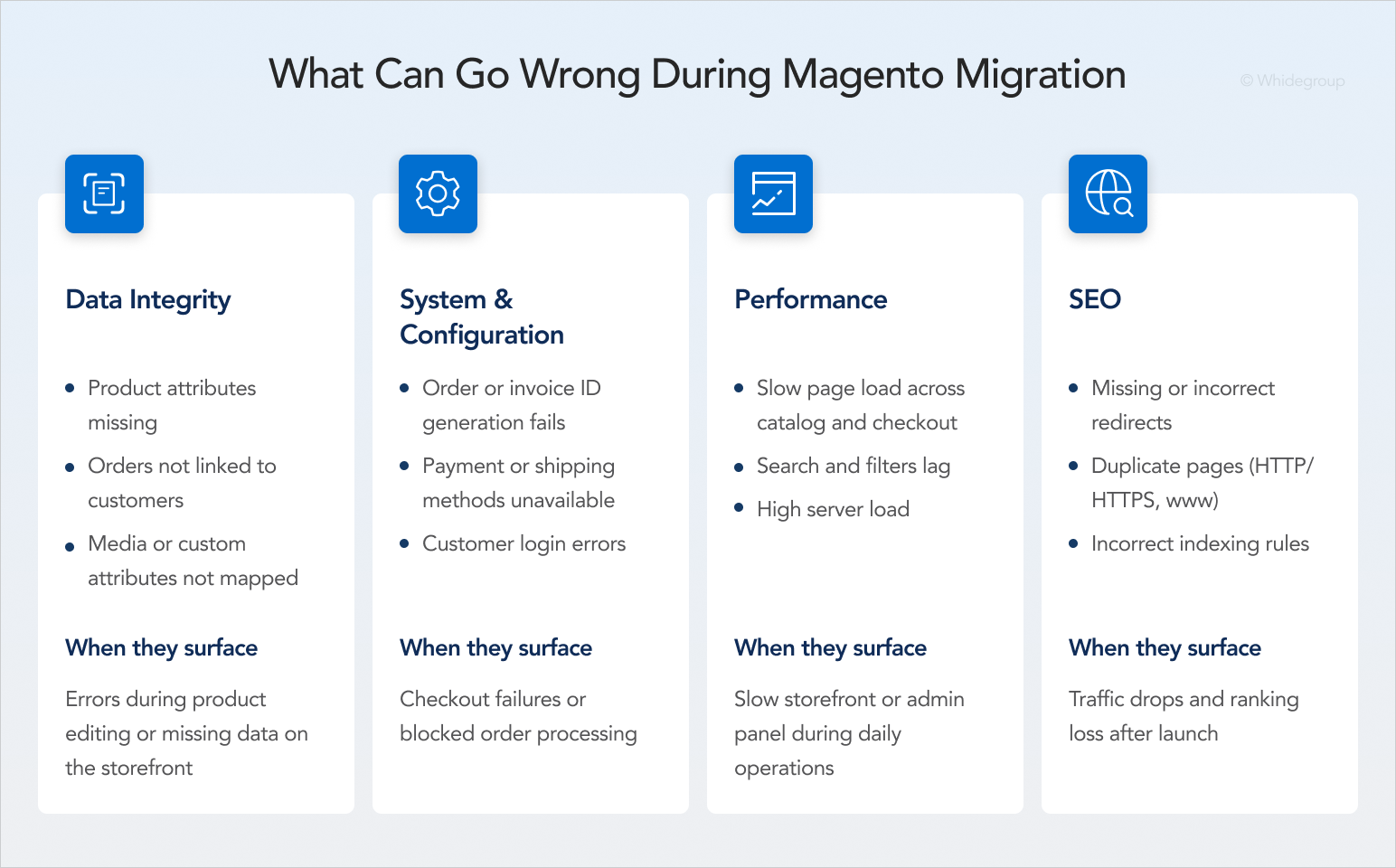
For stores with complex structures, migration tools fail to accurately rebuild relationships between entities. This leads to problems such as:
When they surface. You encounter error messages while saving products, or find that media or categories are missing from the storefront despite being present in the database.
What to check. Attribute tables and database schema to ensure data consistency across products, customers, orders, and their respective attributes.
Databases are the foundation of a properly functioning online store. That’s why Whidegroup developers manually compare migrated entities across databases carefully and only then move on to the next verification stages.
Structural differences between platforms can disrupt critical business flows that result in:
When they surface. Customers cannot place orders, payments fail at checkout, or invoices are not created correctly.
What to check. Payment and shipping configurations, sequence tables, and store setup across all store views.
For example, our team manually places test orders for every payment and shipping method. We verify that each transaction processes correctly and that invoice IDs follow the right sequence.
Performance may degrade due to unoptimized data, indexing issues, or excessive extensions carried over from the previous system. This performance decline is reflected in:
At first glance, these issues seem non-critical. Compared to a broken checkout, that’s true. However, today’s shoppers expect fast-loading websites. That’s why this situation requires Magento performance optimization as quickly as possible; otherwise, you risk losing customers.
When they surface. Pages load slowly, search becomes unresponsive, or the admin panel lags during operations.
What to check. Indexing status, database performance, and the impact of third-party extensions. New Relic is one of our primary tools for checking back-end performance. It helps us identify exactly which extensions or database queries are causing lags so we can fix them quickly.

We’re here to assist!
Migration tools move data, but they do not guarantee correct SEO configuration. Issues usually come from changes in URL structure and indexing settings:
When they surface. Traffic drops, pages disappear from search results, or rankings decline after launch.
What to check. Redirect mapping, canonical URLs, robots.txt rules, and indexing settings in Magento and search engines.
Some technical issues become visible only after the store goes live, especially in complex setups with custom features. A successful launch, therefore, depends on a well-designed migration strategy and a thorough manual audit after using Magento 2 migration tools.
Magento 2 migration is not only about the tool you choose. Success depends on how your data, logic, and integrations are structured.
Migration tools can transfer standard data, but they do not automatically validate complex relationships or rebuild custom functionality. That’s why issues arise after data migration to Magento 2, especially in stores with custom modules or external integrations.
Not sure if a standard tool is enough for your setup? Request a store evaluation, and we’ll audit your technical specifications to define the safest migration path.
Magento data migration tools are a good fit for small to medium-sized stores with a standard database structure. If your site uses default Magento features without custom database entities — requiring only the transfer of products, categories, and customers — a tool handles the bulk import of your old store data to Magento 2. However, you still need a manual check after migration.
If your store has custom modules, complex product logic, ERP/CRM integrations, or a large, non-standard database, standard tools won’t be enough. In this case, tools can support the migration, but Magento specialists still need to manage mapping, validation, custom logic, and integrations manually.
In most cases, yes. Magento 2 migrations often require developer involvement, especially when the store has custom modules, third-party extensions, complex product data, or external integrations. Migration tools can transfer standard data, but developers are still needed to integrate extensions, develop custom modules, and resolve database conflicts, especially for enterprise-level stores.
The main signs of a complex store are:
• A high volume of custom attributesExtensive use of third-party integrations
• The presence of bespoke custom features
• For business owners, these indicators signal the need for a more controlled, developer-led approach during Magento 2 migration.
This approach also ensures the seamless further scalability of a store and simplifies Magento 2 upgrade in the future.
The cost of the migration projects performed by Whidegroup typically ranges from $1,000 to $3,000. The final estimate may increase depending on the volume of data, number of custom integrations, and complexity of the existing site architecture.
To prevent data loss and minimize the risk of store downtime, always perform:
• A full backup of critical data before starting
• A migration on a staging environment before going live
• A delta migration step to sync new orders and customers placed during the process
• Manual validation of migrated data after the process is completed
The core migration phases for legacy systems stay the same as for modern platforms: data audit, core migration, delta migration, and validation.The main difference for legacy or custom-built platforms is that they rarely support automated migration tools. Due to non-standard logic, these systems require thorough individual planning and manual migration by an experienced Magento team — whether in-house or outsourced.


 5 Best Website Builders for Jewelry Business: Costs, Pros, and Cons for Ecommerce...



URLs! Every Magento company highlights them during migration, but store teams still often underestimate detailed URL and redirect mapping.
Whidegroup specialists compare old and new URL structures, validate redirects, and check indexing rules to prevent traffic loss after a migrated store launch.