Hyvä Theme for Magento 2:
Complete Guide to Features, Benefits, and Development
 23 mins read
Hyvä Theme for Magento 2:
Complete Guide to Features, Benefits, and Development
23 mins readMagento 2 is a powerful ecommerce platform, but its default front end often becomes the first place where performance problems show up.
Hyvä Theme for Magento 2 was created as a different approach that replaces the traditional front-end stack with lightweight technologies supporting faster page rendering and improved JavaScript optimization. As a result, Hyvä stores often achieve stronger Core Web Vitals metrics, shorter load times, and a more maintainable front-end architecture.
However, the Hyvä Theme has certain limitations. In this article, we explain how Hyvä works, explore its key features and benefits, compare it with other Magento front-end approaches, and discuss situations where alternative solutions may be a better fit.
We also share migration recommendations based on Whidegroup’s practical experience and show the results of a real Hyvä migration project.
Whidegroup helps you plan and implement a faster Magento storefront — from migration to custom development and support.
Hyvä Theme is a modern Magento 2 front end designed as an alternative to the default Luma storefront. Hyvä replaces outdated technologies with a leaner, lighter architecture. At the same time, Hyvä remains a monolithic storefront within the Magento platform, unlike decoupled front ends built with headless frameworks.
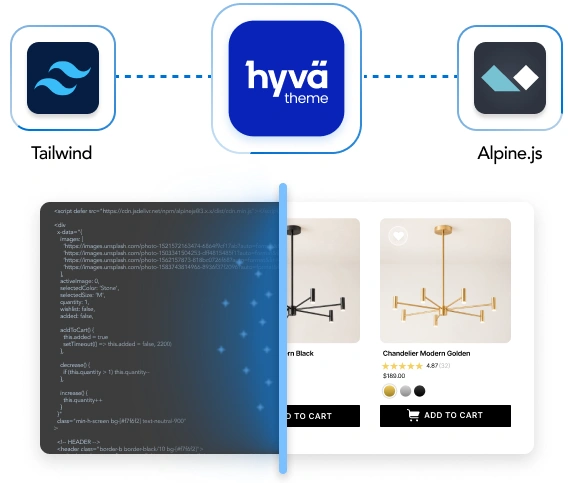
Architecture setup. Instead of relying on Knockout.js, RequireJS, and other parts of the traditional Luma stack, Hyvä uses Tailwind CSS and Alpine.js. This technology setup reduces front-end complexity, decreases page weight, and helps improve page load speed and CWV metrics.
Additional products. Beyond the storefront itself, the Hyvä ecosystem now includes products such as Hyvä UI, Hyvä Checkout, and Hyvä Commerce. The company also offers Hyvä Enterprise, which extends the platform with additional B2B functionality for Adobe Commerce merchants.
Growing audience. Since its launch, Hyvä has seen steady growth in the number of live stores. Each year, more merchants adopt Hyvä when launching new websites and upgrading existing ones. You can see how brands design their websites by exploring real Hyvä store examples.
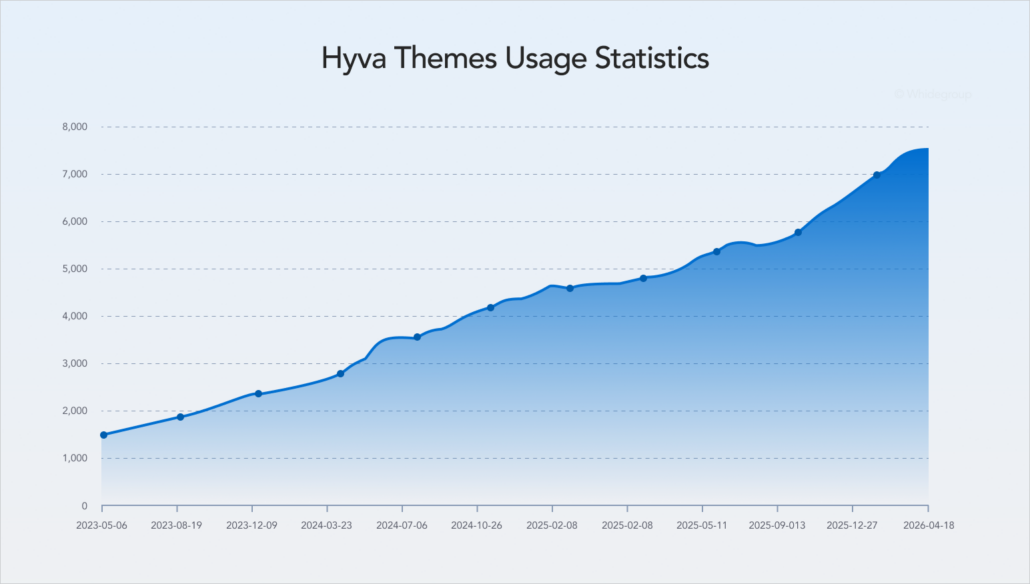
The reason why Hyvä is gaining popularity lies in the technologies behind it. In the following section, we explain how Hyvä changes Magento’s front-end architecture by replacing key parts of the traditional Luma stack.
To understand why Hyvä delivers faster storefronts and a simpler development experience, let’s take a closer look at how it changes the Magento front-end architecture.
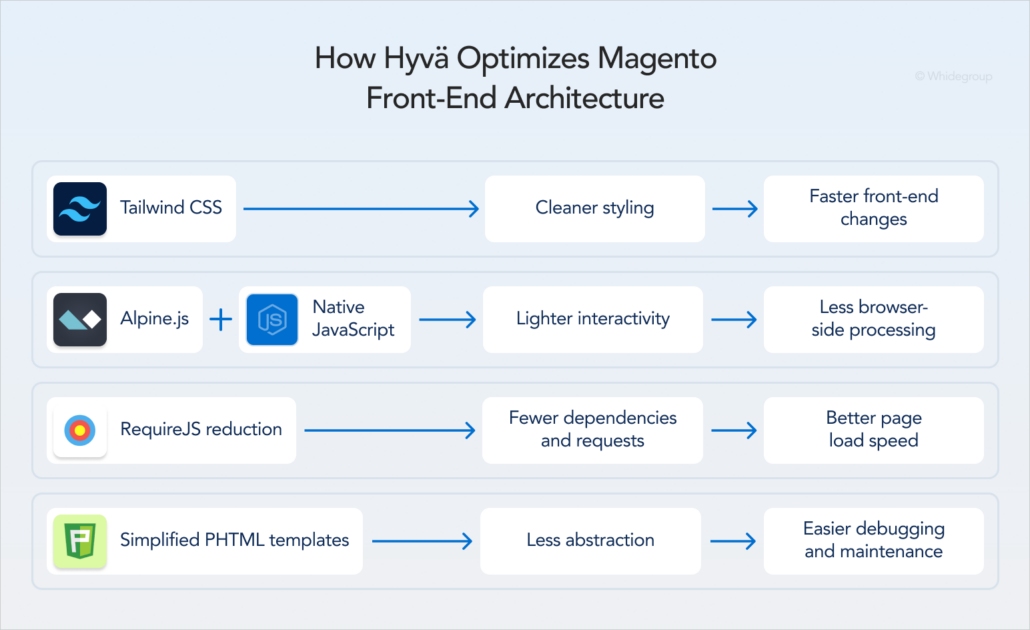
Luma relies on a large collection of LESS files and predefined styles that often require extensive customization. Hyvä replaces this approach with Tailwind CSS.
Tailwind CSS handles styling and page layout through utility classes applied directly in templates. When configured properly, this framework helps keep the final CSS payload smaller by removing unused styles during development.
Interactive elements in the default Magento 2 front end rely on the Knockout.js library. This framework adds extra JavaScript that browsers must download and execute. As storefronts become more customized, the amount of JavaScript grows, increasing browser workload and affecting page performance.
To reduce unnecessary JavaScript overhead, Hyvä provides a complete Knockout.js replacement, using Alpine.js instead. This framework uses significantly less JavaScript and adds interactivity directly within HTML templates.
Alpine.js is especially useful for lightweight interactions such as dropdowns, tabs, quantity selectors, toggles, and simple form behavior. More complex storefront features, like dynamic product options or cart updates, can also be implemented in the Hyvä stack, but they may require additional custom development.
In the traditional Luma stack, RequireJS loads and manages interactive functionality in a way that adds dependencies, extra requests, and more browser-side processing.
Hyvä supports RequireJS reduction by using modern native JavaScript. With fewer front-end dependencies and less JavaScript for the browser to load and process, Hyvä helps improve page load speed and provides better Core Web Vitals performance.
Both Luma and Hyvä use Magento’s native PHTML templates, but they use them differently.
In Luma, PHTML templates work alongside Magento UI components, which integrate templates, JavaScript logic, and configuration files. This architecture powers product options, filters, forms, checkout, and other storefront functionality, but it also introduces additional front-end dependencies.
Hyvä removes many of these dependencies by implementing most storefront functionality through simplified PHTML templates, Alpine.js, and native JavaScript. As a result, developers work with templates that are easier to understand and customize.
Let’s recap the changes that Hyvä brings to Magento’s front-end architecture. Hyvä uses simplified PHTML templates as a foundation, Tailwind CSS for styling, and Alpine.js together with native JavaScript for interactivity. Compared to their Luma counterparts, these technologies are lighter and easier to maintain.
The Hyvä ecosystem continues to expand with products and tools that help merchants and developers address a wider range of ecommerce requirements. Below are some of the main Hyvä features available today.
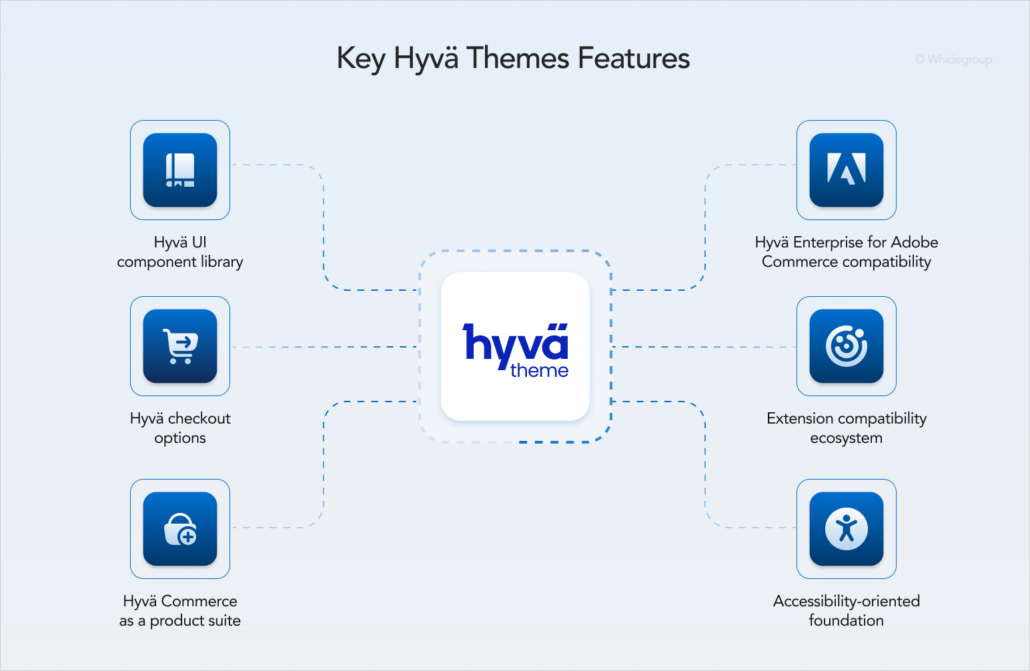
Hyvä UI is a library of pre-designed components that includes both standalone elements, such as add-to-cart buttons and navigation controls, and ready-made storefront sections, such as product specifications, galleries, and category page grids.
All Hyvä UI components are mobile-friendly and easy to customize, which helps designers and developers build and adapt storefronts faster while maintaining brand consistency.
The standard Magento 2 checkout relies heavily on Knockout.js and Magento UI components, which are not part of the Hyvä front-end architecture. That’s why the checkout page requires a separate migration strategy.
To ensure efficient order processing after moving to Hyvä, merchants can choose from the following options:
Merchants can still keep the standard Magento 2 checkout after migrating to Hyvä. Businesses sometimes choose this option when a store has extensive checkout customizations and they want to avoid rebuilding everything from scratch.
Although it’s technically possible to stay with the default checkout, Whidegroup developers generally do not recommend keeping it. The standard setup may simplify the initial launch, but it also saves part of the old Magento development stack in the project. This legacy front end can create extra maintenance work and complicate future Magento or Hyvä upgrades.
Hyvä Commerce is a suite of modules compatible with both Magento Open Source and Adobe Commerce. This suite includes Hyvä Theme, Hyvä UI, and Hyvä Checkout. In addition, Hyvä Commerce provides several features that are not currently available as standalone Hyvä products:
Hyvä Enterprise is an add-on for merchants who use Adobe Commerce and want to adopt the Hyvä front end. This module extends Hyvä Theme and Hyvä Checkout to support Adobe Commerce features that are not available in Magento Open Source: B2B functionality, Live Search, Product Recommendations, customer-specific attributes, loyalty, and gifting features.
When Hyvä first launched, extension compatibility was one of the main migration concerns. Because Hyvä replaced much of Luma architecture, developers often had to create separate compatibility modules to adapt their extensions for Hyvä.
Today, extension compatibility is much less of a challenge, as most major Magento providers offer official Hyvä support or compatibility modules.
Even so, stores that rely on legacy extensions with limited maintenance may still encounter integration issues. In such cases, Whidegroup recommends evaluating modern alternatives that provide similar functionality. If replacing the module is not possible, an experienced Magento development team can adapt the extension to work with Hyvä.
Hyvä follows the accessibility principles defined in WCAG and incorporates them into the front-end architecture. The theme supports keyboard navigation, screen readers, proper focus management, and semantic HTML structure.
Hyvä also promotes accessibility-focused design through improved color contrast, readable typography, sufficient spacing, and descriptive labels for interactive elements.
The Hyvä ecosystem includes a range of features that improve the experience for both store visitors and ecommerce teams. The following section shows how these peculiarities translate into business value.
After looking at how Hyvä changes the Magento front end and which tools support this architecture, the next question is what these changes mean for store owners.
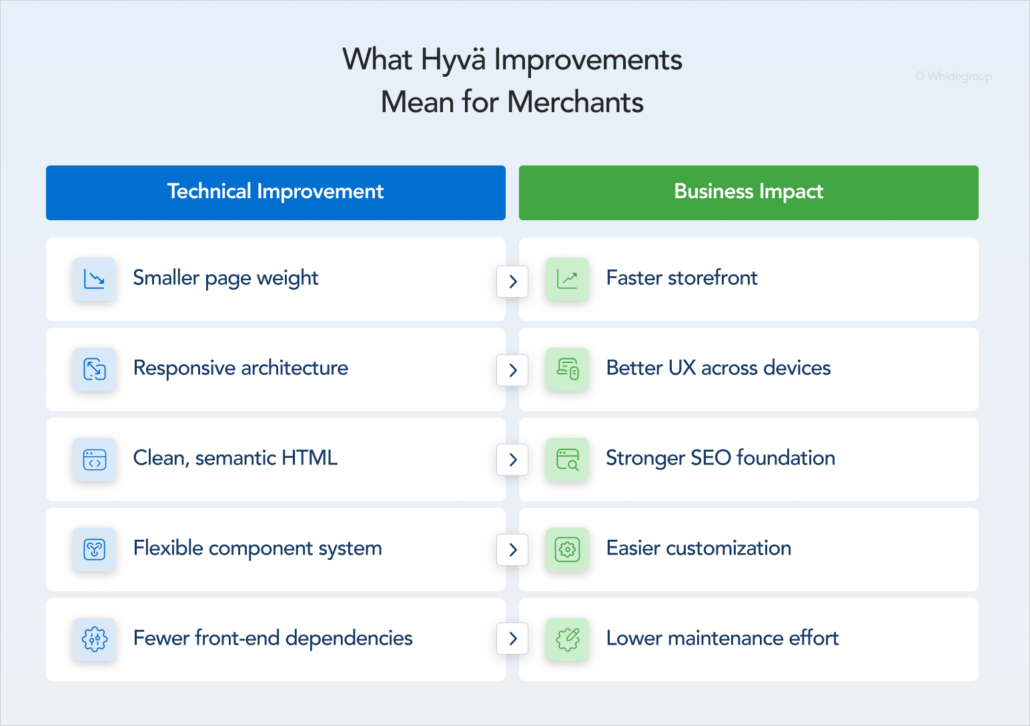
Hyvä front-end architecture is lighter and less dependent on large JavaScript and CSS libraries than the default Luma storefront. When implemented correctly, this leaner setup can improve store performance by:
These improvements help visitors interact with the store faster. In turn, merchants may notice lower abandonment rates and higher conversions.
Hyvä provides faster page rendering and quicker responses to user actions across desktops, tablets, and smartphones. Because storefront elements load and react with less delay, shoppers can move through category pages, product pages, filters, and checkout with fewer interruptions.
For mobile users, this smoother experience matters even more. When pages load faster and storefront interactions feel more stable, merchants can reduce friction in the shopping journey, supporting lower abandonment rates and better conversion.
Hyvä’s lightweight front-end architecture contributes to several SEO factors, including faster page load speed, stronger CWV metrics, and responsive design. These improvements help create a smoother experience for users and a cleaner technical environment for search engines.
Hyvä’s codebase also makes it easier for developers to implement meta tags, structured data, and other SEO elements. Clean, semantic HTML also allows search engines to crawl and understand store content more efficiently.
Hyvä does not automatically improve search engine rankings, but it provides a stronger technical foundation for SEO than the default Luma storefront.
While Hyvä offers pre-designed blocks and elements, it does not lock store teams into rigid theme structures. Developers can use ready-made components and adapt them to match brand identity and specific user flows. As a result, merchants can achieve a tailored storefront experience without having to order a custom design.
Hyvä CMS further simplifies routine content and layout updates, reducing the involvement of technical experts. Still, larger UX improvements and design changes require proper design and development expertise.
Migrating to Hyvä requires upfront development effort, but for many merchants we’ve worked with it makes sense as a long-term investment. Several factors can contribute to this long-term cost efficiency:
One of our clients reports a lower total cost of ownership after migrating to Hyvä, despite completing the project when Hyvä was a paid theme:

There is no single Magento front-end approach that works best for every business. The right choice depends on your budget, performance requirements, development resources, and long-term ecommerce strategy.
The table below compares the most common Magento front-end options to help merchants understand where each approach fits best.
| Option | Hyvä | Luma | PWA | Headless |
|---|---|---|---|---|
| Architecture | Monolithic Magento storefront with a front-end stack based on Tailwind CSS and Alpine.js. | Traditional Magento storefront based on Magento UI components, Knockout.js, RequireJS, and LESS. | Decoupled front end, typically built with React and connected to Magento through APIs. | Decoupled architecture where any front-end technology can be used. |
| Best for | Merchants who want better performance and easier front-end maintenance without moving to a headless architecture. | Existing stores with simple front-end requirements or tight budget constraints. | Businesses that prioritize app-like mobile experiences and advanced customer interactions. | Organizations that need maximum flexibility across channels and have development teams experienced with modern front-end frameworks. |
| Pros | • Lightweight Magento-native front end • Strong CWV potential • Simpler than PWA or headless implementation • Expanding ecosystem of Hyvä-compatible modules • Faster storefront modernization without full decoupling | • Default Magento storefront theme • No migration required • Broad extension compatibility | • App-like user experience • Offline capabilities • Faster client-side interactions • Front-end independence | • Complete control over customer experience • Technology stack flexibility • Omnichannel experiences across websites, mobile apps, kiosks, IoT devices, and other touchpoints |
| Limitations | • Migration project required • Some extensions need compatibility work | • Legacy front-end stack that is difficult to customize and optimize • Slower performance under otherwise identical conditions | • Higher development and maintenance effort • Requires additional work for SEO configuration • Extension compatibility in most cases requires extra work | • Significant development and maintenance effort • Complex integrations • Requires specialized expertise |
| Complexity | Low to medium | Medium | High | Very high |
| Cost level | Medium | Low to medium | High | Very high |
Merchants looking for a faster and easier customizable alternative to Luma often narrow their decision to Hyvä or PWA. Both approaches can deliver good performance, but they differ significantly in development, maintenance complexity, and long-term costs. For a detailed breakdown, read our comparison of Hyvä vs. PWA.
In this section, let’s explore closer, when the Magento 2 Hyvä Theme will be a good option for your store.
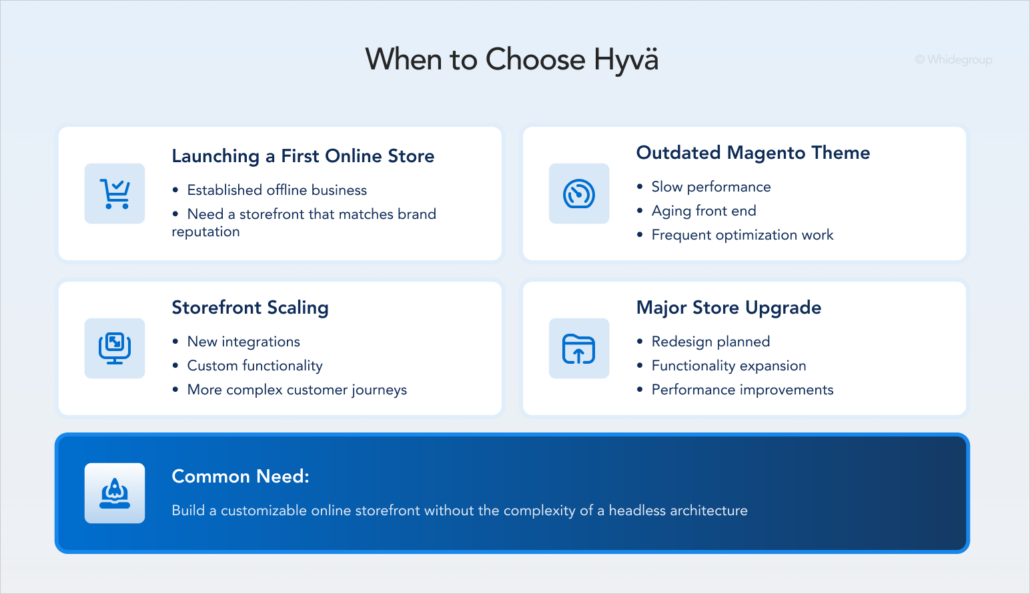
If your company has already built a strong reputation through physical stores, your ecommerce website should deliver the same level of quality and trust that customers already associate with your brand.
Starting with Hyvä allows you to launch a Magento storefront with strong performance potential and a user experience aligned with your brand standards. Instead of investing in a theme that may require major upgrades later, you can build on a more future-oriented foundation from the beginning.
Many Magento stores continue to run on themes developed years ago and have accumulated performance and usability issues over time.
When you consider a design refresh alongside performance optimization, it may make sense to do it on the simpler Hyvä tech stack rather than patching an old theme again and again.
After scaling your ecommerce business, you may need new integrations or even bespoke features to align with your updated business flow and enhance the user journey. Yet Luma hardly supports expanded functionality without decreasing performance.
In such cases, a Hyvä migration project may be a more cost-efficient option than adding all necessary functions to a Luma-based store and then optimizing it for speed. In addition, Hyvä simplifies upgrades as your business grows further.
A Magento site overhaul is a good time to rethink your front end. If the project already includes redesign, new features, and performance optimization, it makes sense to address them in one roadmap rather than as separate future tasks.
Modifying the existing Luma storefront may seem easier at first, but it does not always solve the underlying front-end limitations. Developers may still need to adapt the new design, adjust custom elements, and continue performance optimization on the same older architecture.
Hyvä migration turns a standard redesign into deep storefront modernization, allowing you to execute required updates much more efficiently than on Luma. Ultimately, customizing an old theme during a large-scale project rarely saves time or cuts costs compared to Magento Hyvä development.
Our Hyvä experts assess your current storefront and business goals to create an optimized migration plan.
Hyvä can provide significant performance advantages, but it is not always the most practical choice for an ecommerce business. There are situations where other approaches may be more practical.
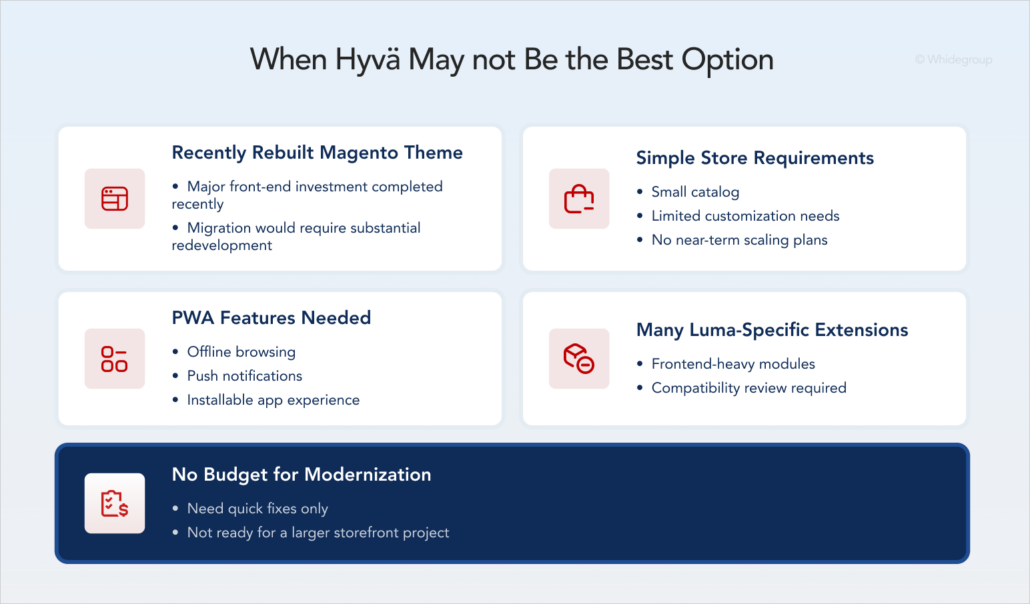
If your store runs on a heavily customized front end, especially after a recent redesign or optimization project, a Hyvä migration is rarely the optimal next step. Hyvä requires substantial redevelopment work to recreate existing functionality within its architecture, involving a significant repeated investment.
If you think you still need Hyvä, start by describing in detail the issue with your existing custom theme. A consultation with a Magento development agency can help determine whether supporting the Luma storefront or migrating to Hyvä will deliver better long-term value.
If your Magento store has a small product catalog, standard customer journeys, and no immediate plans to scale, investing in a completely new front-end architecture may be premature.
At this stage, maintaining the default storefront or adopting a modern, ready-made Magento theme is usually enough. Luma delivers all the necessary functionality for Magento stores with simple ecommerce requirements.
If you choose to scale your business and need to add custom features, migrating to Hyvä will be a viable next step. Its value becomes clearer as storefront complexity and customization requirements grow.
If your business requires offline browsing, push notifications, installable app-like experiences, or a fully independent front end, these requirements fall outside the scope of Hyvä.
In this case, a Magento PWA alternative or another headless solution may be a better fit, especially if the project requires advanced customer experiences across websites, mobile apps, kiosks, IoT devices, and other touchpoints.That said, it is important to evaluate whether PWA capabilities are truly necessary for your business. Our Hyvä vs. PWA comparison explains the differences in development costs, maintenance requirements, and project timelines.
Extension compatibility has expanded significantly since Hyvä’s launch, and many major Magento extension providers now offer official Hyvä support.
However, stores that rely heavily on frontend-intensive modules should evaluate compatibility before committing to a migration. Some extensions may still require compatibility packages, custom front-end development, or replacement with alternative solutions.
A technical audit helps identify potential compatibility issues early and provide a more accurate estimate of migration projects.
Hyvä migration is not a plug-and-play upgrade. Stores with custom functionality, third-party integrations, multiple storefronts, or extensive design requirements require careful planning, development, and testing.
Hyvä delivers the greatest value as part of a broader storefront modernization strategy. If your immediate goal is limited to improving page speed or refreshing the visual, targeted Magento optimization or design services may be more appropriate.
Initially, your team should evaluate the existing Magento setup, identify potential compatibility risks, and gather migration project requirements that align with your business goals.
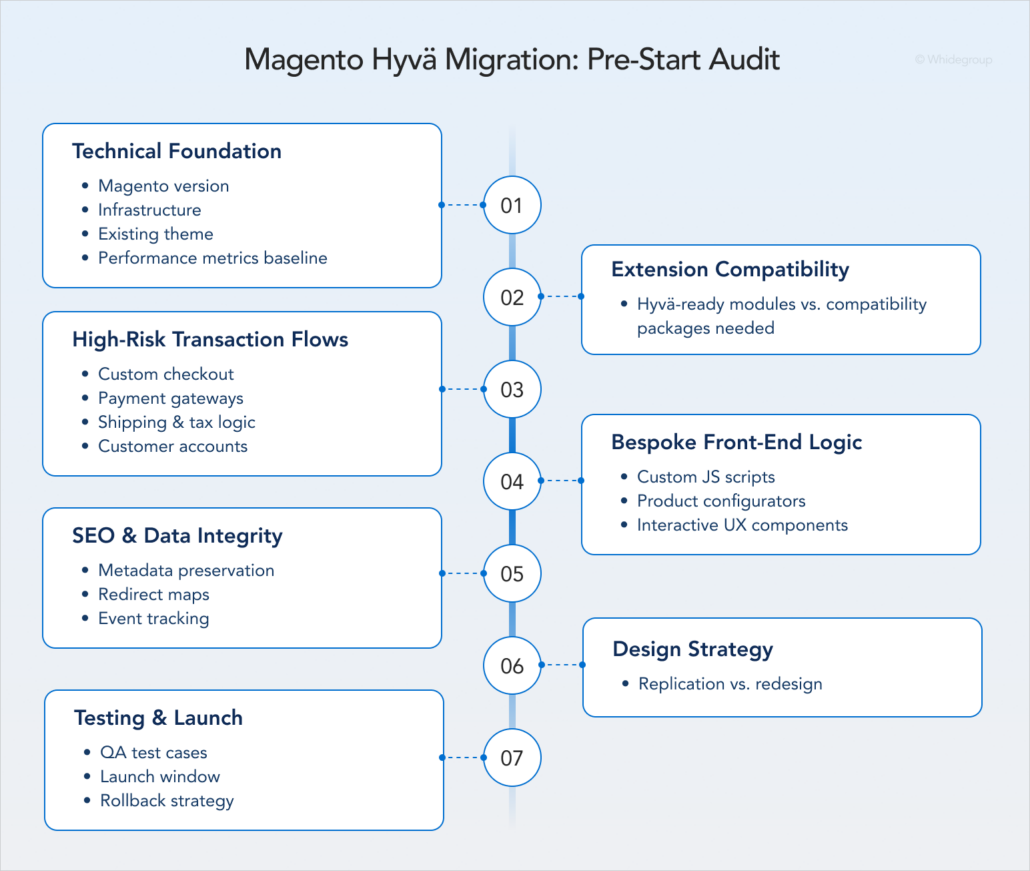
The first step is to review your current technical setup:
Most major Magento extension providers now offer Hyvä compatibility, yet compatibility should never be assumed.
Create a list of all installed modules and identify which ones already support Hyvä, which require compatibility packages, and which may need replacement. This review helps avoid unexpected development work later in the project.
Checkout is one of the most sensitive areas of any ecommerce website. Review any functionality that extends beyond standard Magento features or ready-made integrations, as these customizations often require additional development and compatibility work.
Review the following areas before migration:
Since Hyvä uses a different front-end architecture than Luma, the following elements often require compatibility review:
To preserve your search engine rankings and continuity of data reports, make a list of necessary settings:
Before starting a Hyvä migration, you should decide whether the goal is to recreate the existing storefront design or use the project as an opportunity for a redesign.
In practice, design projects can be organized in one of three ways:
Quality assurance and launch requirements should also be planned from the start to avoid delays and deployment risks:
Unlike traditional Magento themes, Hyvä does not come with fixed page layouts or work as a ready-made storefront for light customization. Instead, the theme provides a lightweight foundation for building a custom Magento storefront, so every project involves some level of custom development.
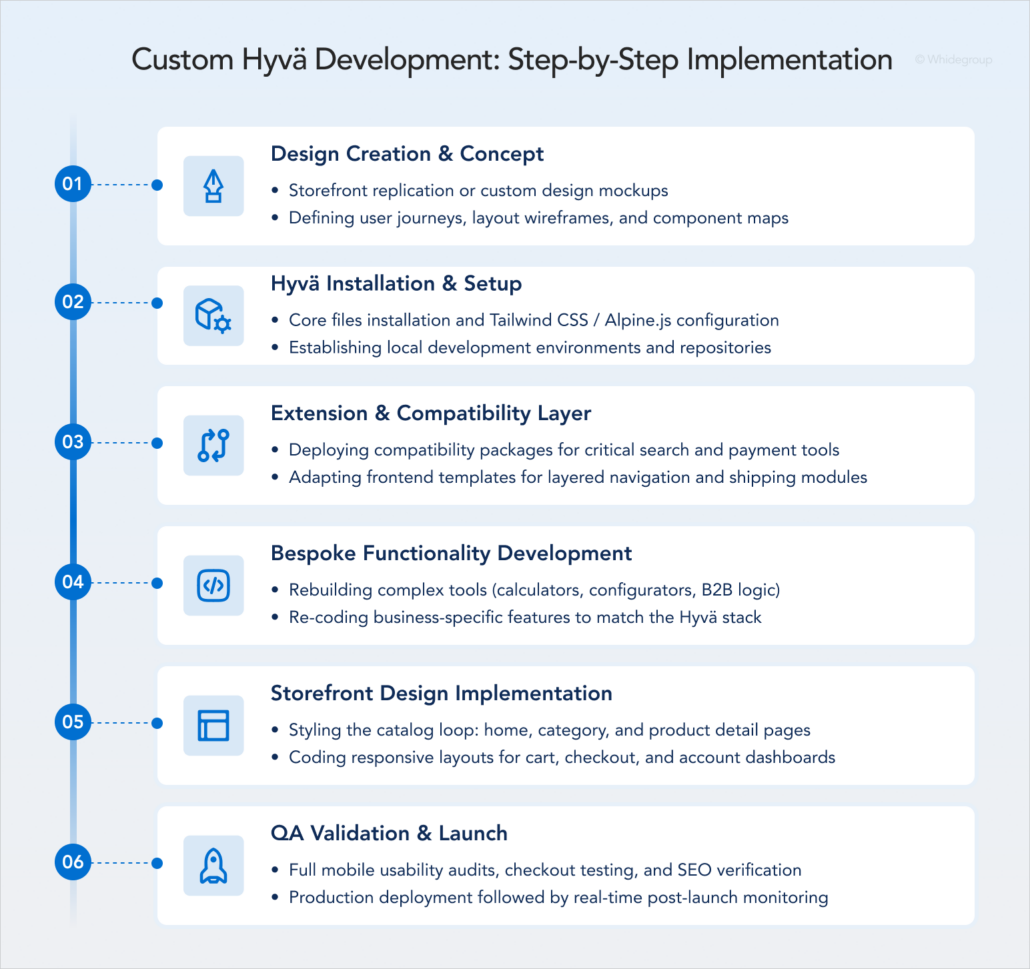
The question of where to place the design phase in the workflow is somewhat controversial among development teams. Not every company puts it first.
At Whidegroup, we consider a design-first workflow the most efficient because it helps reduce the overall project timeline. While designers prepare page mockups and component specifications, developers can begin preparing the technical foundation for the migration.
The technical work starts in parallel with the design phase. Developers install the Magento 2 Hyvä Theme, configure related modules, and set up the basic storefront structure. This foundation allows the team to start customizing the storefront as soon as the design files are ready.
The development team evaluates each extension included in the migration scope and determines whether native Hyvä compatibility already exists. Depending on the module, further work may involve installing compatibility packages, adapting front-end templates, or rebuilding storefront interactions to work with the Hyvä architecture.
Based on Whidegroup experience, features that often need particular attention include:
Bespoke storefront functionality requires separate implementation in the Hyvä storefront. The most common customization requests in our experience include:
Once the technical foundation is ready, developers build the storefront itself. This includes implementing the approved design across key customer-facing pages, such as:
As part of the storefront implementation, developers create reusable UI elements which usually include buttons, banners, product cards, navigation menus, filters, and forms. Using these components across multiple pages helps our developers speed up the migration project and simplify future updates.
Before launch, the project team verifies that all migrated functionality works correctly in the new storefront.
At Whidegroup, our testing checklist includes, but is not limited to, the following steps:
After validation, the storefront is deployed, and developers monitor its performance after launch to identify issues that may appear under real customer traffic.
Hyvä migration costs depend on catalog complexity, design scope, extension setup, and the required level of store customization. Below, we break down the main factors that affect the total cost.
These factors typically combine into projects of different complexity. At Whidegroup, we divide projects as shown below.
| Project type | Typical scope | Estimated cost, $ |
|---|---|---|
| Basic | • Design with Hyvä UI and minor adjustments • Up to five extension integrations without customization • Hyvä Checkout implementation (recommended but not mandatory) | Up to 9,000 |
| Mid-sized | • Custom page design • Up to ten extension integrations with minor customization • Minor custom extension development • Hyvä Checkout implementation | 16,000–21,000 |
| Enterprise | • Extensive design customization • Up to 20 extension integrations with customization • Custom extension development • Hyvä Checkout implementation • B2B functionality integration (optional) | Starts from 30,000 |
This table features our prices for existing stores migrating to Hyvä. To learn about the total cost of building a new Magento store from scratch with a Hyvä front end, read our dedicated article on Magento development costs.
As an Adobe Bronze Solution Partner and Hyvä Supplier, Whidegroup has worked on both Hyvä migrations and custom storefront implementations. The recommendations below reflect challenges we see in real projects and can help merchants plan migrations more effectively.
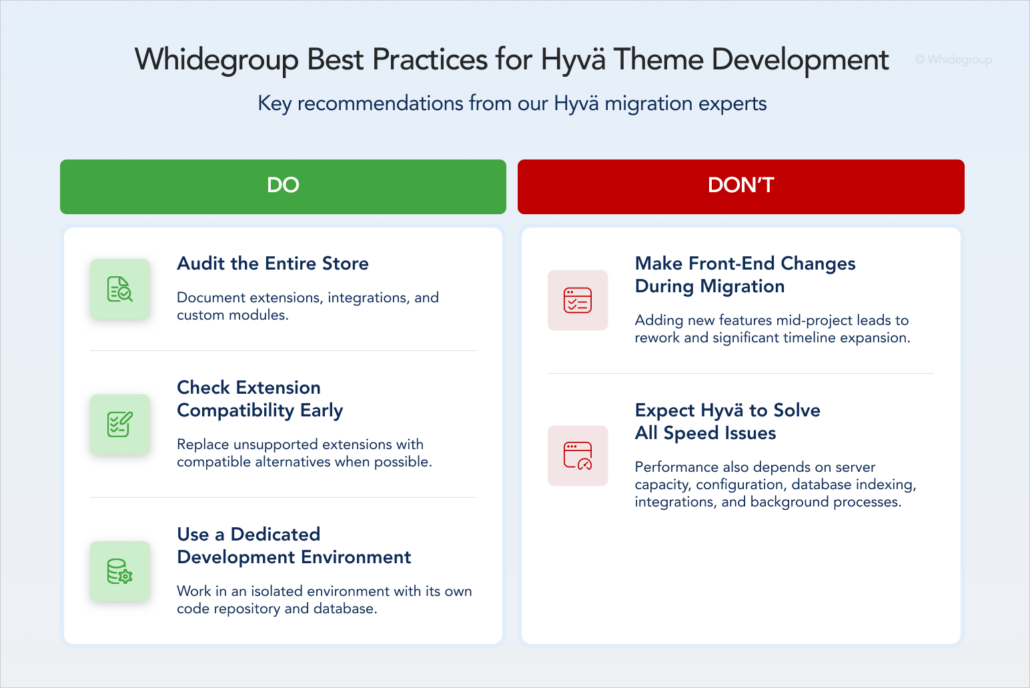
Before requesting a migration estimate, document your current Magento setup as thoroughly as possible. Review not only the storefront but also the extensions, integrations, and custom modules connected to it.
The more complete your inventory of existing functionality and planned changes is, the more accurately our development team can estimate timelines and costs.
After migrating eight Magento stores to Hyvä, our team found that extension compatibility is usually the largest variable in the overall project estimate.
When an extension lacks Hyvä support, replacing it with a compatible alternative is often more cost-effective than adapting the existing solution. We recommend custom development only when no suitable replacement exists. Experience with extension adaptation is therefore an important factor when choosing Hyvä developers for a migration project.
Before the project starts, make sure your development team plans to work in a separate environment with its own code repository and a copy of the production database.
Hyvä migration projects often take several months, during which your existing store remains active. An isolated environment allows developers to implement and test changes without affecting daily operations.
Large Hyvä projects can take more than five months to complete, while the existing Luma storefront continues serving customers. During this time, merchants often identify additional improvements they would like to integrate into the live store.
We have seen migration timelines extend significantly because functionality added midway through the project had to be recreated twice — once for the existing store and again for the Hyvä storefront. For this reason, we strongly recommend limiting new front-end features and design changes during the migration.
Merchants sometimes keep highly customized Luma-based functionality to reduce redevelopment effort. However, maintaining both the Hyvä and Luma front-end stacks rarely lowers long-term costs.
This mixed setup makes development more complex, slows down troubleshooting, and increases compatibility risks with every upgrade to Magento, Hyvä, and extensions.
Hyvä provides a strong foundation for faster page rendering, but page load speed depends on more than the front end. Server capacity and configuration, database indexing, third-party integrations, and background processes can also affect store performance.
If these areas are not properly optimized, Hyvä migration alone does not guarantee the expected performance improvements.
The recommendations above are based on practical experience from Hyvä projects. The following case study shows how these principles translated into measurable performance improvements.
For a German garden plants store, Whidegroup migrated the storefront from the Porto theme to Hyvä. During the migration, we refined the user interface and adapted ten Magento extensions for Hyvä compatibility.
After launching the updated store:
Overall, the migration increased the store’s performance score by 27 points and improved Core Web Vitals, which led to faster page loading and a better user experience.
The decision about the Hyvä migration is rarely about an isolated speed optimization project. More often, it is a decision about how the storefront will evolve as the business grows. With the right implementation, Hyvä can improve store performance, streamline maintenance, and support ongoing improvements.
Not sure how Hyvä fits into your business plans? Request a free Hyvä migration consultation with our technical architect. We’ll review your current store, answer your questions, and help you make an informed decision about the next steps.
Hyvä Theme is a modern Magento 2 front-end framework that replaces Magento’s traditional Luma stack, including Knockout.js, RequireJS, and LESS, with a lighter architecture based on Tailwind CSS and Alpine.js. As a result, stores often achieve better performance, simpler front-end maintenance, and stronger Core Web Vitals results.
The main Hyvä Theme features and benefits make it a practical choice for merchants who want to:
• Replace a slow or difficult-to-maintain Luma-based front end.
• Improve page load speed and strengthen Core Web Vitals potential.
• Simplify future storefront customization and maintenance.
• Modernize a Magento storefront without moving to a headless architecture.
Yes. Hyvä Theme is free to download and use. Still, the broader Hyvä ecosystem also includes commercial products such as Hyvä Checkout, Hyvä Commerce, and Hyvä Enterprise. You can continue using Magento’s default functionality or free third-party alternatives, but Hyvä’s paid modules offer additional features and simplify store management.
In many cases, yes. Hyvä offers a lighter and more modern front-end architecture that can simplify maintenance and improve performance. However, stores with simple requirements and no plans for significant customization may find that Luma continues to meet their needs.
Hyvä can improve Core Web Vitals by replacing Magento’s traditional front-end stack with a lighter architecture, including a Knockout.js replacement and more efficient JavaScript optimization. As a result, stores often achieve better scores for LCP, CLS, and INP.
Having said that, Hyvä does not guarantee improvements on its own. The results also depend on implementation quality, media optimization, third-party extensions, server configuration, and back-end performance.
No. Hyvä is a Magento front end built specifically for Magento 2 stores and operates within Magento rather than as a separate application connected through APIs. Businesses that require app-like functionality or a fully decoupled architecture should consider PWA or another headless approach.
Often, yes. Many popular Magento extensions now support Hyvä, but compatibility varies by module and should be checked individually. Extensions without native Hyvä support may require adaptation, replacement, or additional Magento Hyvä development work.
Yes. Hyvä provides building blocks rather than fixed storefront layouts, allowing developers to create custom Hyvä themes tailored to specific business and design requirements. The level of customization depends on the project’s goals, complexity, and budget.
The timeline for Hyvä migration depends on the size, custom code, integrations, extensions, and checkout complexity of your current Magento store.
Based on Whidegroup experience, migrating to Hyvä typically takes anywhere from 6 weeks for small websites with minor customizations to 10 months for projects with numerous integrations and extensive custom code. In any case, it’s best to start with a technical audit to get a realistic estimate.
Yes. Successful Magento Hyvä development requires knowledge of both Magento’s architecture and the Hyvä front-end stack. Developers should understand extension compatibility, custom functionality, integrations, and storefront performance requirements.
Hiring Hyvä developers with relevant project experience can help reduce migration risks and ensure the storefront is implemented and maintained correctly.
Yes. Hyvä is built exclusively for Magento 2 and isn’t compatible with other ecommerce platforms such as Shopify, BigCommerce, or WooCommerce. Hyvä was specifically designed to address Magento’s front end performance limitations and offer a smarter alternative to traditional themes like Luma or Porto.


 Top Jewelry Ecommerce Trends in 2026: What to Expect and Prepare For





Our store has been running on the Hyvä Theme for more than two years. Looking back, I’m confident it was the right decision — ecommerce is a major part of our business, and we have to think about the future.The investment in the license isn’t significant if you’re already planning a retheming project.
One of the retheming challenges is that the entire front-end must be redesigned. This requires organizing all the existing elements, which takes time and budget. Our project, like I believe many other long-standing ones, had accumulated some low-quality elements and implementations over the years. When we switched to Hyvä, we took the opportunity to clean up all of that. The project is now in a much healthier state.
If we were starting a new Magento project today, we would absolutely choose Hyvä from the beginning. The theme is gaining popularity, and I’m sure that more modules supporting it will appear soon. That also means a growing number of qualified developers who know how to work with Hyvä.