Top Magento Extensions:
Expert Picks, How to Choose,
and How We Build Better Ones
 18 mins read

Top Magento Extensions:
Expert Picks, How to Choose,
and How We Build Better Ones
18 mins readFinding the top Magento extension for your online store among 4,000 available on the market can feel like searching for a needle in a haystack. Sounds familiar?
Fortunately, with over a decade of experience managing complex Magento stores, setting best Magento integrations, selecting and customizing ready-made extensions to fit business needs, Whidegroup is ready to share its expert findings with you.

From complex integrations to custom features – discover how your online store transforms with our services
Without further ado, let’s move on to the most popular Magento extensions that can boost your store in 2026. We’ve grouped them into several categories. Feel free to use the table of contents below to jump directly to the section you’re most interested in.
You can use ready-made modules to integrate your existing accounting software (e.g., QuickBooks) and improve the efficiency of financial data management. This includes exporting reports, tracking all stages of your sales (order, payment, packaging, delivery, etc.), managing taxes, creating reports, and more.
| Extension |  QuickBooks Online Integration |  Sales Tax Automation |  Connect Xero |
|---|---|---|---|
| Seller | Meetanshi | TaxJar | Fooman |
| Price* | $319 | Free | $209.10/year |
| Compatibility | 2.3, 2.4 | 2.0, 2.1, 2.2, 2.3, 2.4 | 2.3, 2.4 |
| Key Features | • Real-time immediate and scheduled data exports • Payment methods synchronization • Inventory management • Tax mapping • All major data entities support • Hyvä-compatible | • Easy and quick install • Return-ready, jurisdiction-level reporting • Instant sales tax rates and calculations • Multi-channel reports • AutoFile feature to automatically submit returns to the US states | • Automatic customer records matching • Tracking of Magento sales in Xero • Advanced tax settings • Multiple currency support • Technical support included |
* Hereinafter:
1. Prices refer to the Magento Open Source version.
2. The listed prices apply only to Magento extensions; if they integrate your Magento 2 store with third-party services, those services may charge a separate fee.
An online support module equips your store with tools like live chats, support ticket management, customer feedback collection, etc. These extensions help personalize the shopping experience, improve communication, and boost conversion rates customer loyalty. Below are our top Magento picks.
| Extension |  Help Desk Ultimate |  Live Chat |  Magento 2 Help Desk Extension |
|---|---|---|---|
| Seller | Aheadworks | LiveChat | Landofcoder |
| Price | $339/year | Free | Without support – Free With support – $99/month |
| Compatibility | 2.4 | 2.0, 2.1, 2.2, 2.3, 2.4 | 2.0, 2.1, 2.2, 2.3, 2.4 |
| Key Features | • Ticket page at backend • Reopening tickets • Email gateway • Customizable automation possibility • Management of customer inquiries • Inquiries prioritization • Lifetime access to the original codebase • 1-year access to all updates | • Automated and personalized messages • Real-time access to cart details • Multiple chat sections • Asynchronous communication possibility • Customer feedback collection • Multiple third-party integrations | • Help desk system with GraphQL support • SendGrid compatibility • Chatting with multiple customers simultaneously • Multiple ways to get support • File attachment to the ticket • Ticket auto-expiration and auto-reminder |
Every online store needs at least one Magento payment gateway, but offering basic payment functionality isn’t enough. Your checkout process must combine convenience with data security. If it doesn’t, your customers will choose competitors who make payments easier.
Key elements of an optimized payment experience include:
Below, we highlight Magento extensions that make checkout smoother and help you maintain customer engagement and loyalty.
| Extension |  One Step Checkout |  Two Factor Authentication |  Opayo (Sage Pay) and Subscription |
|---|---|---|---|
| Seller | Aheadworks | Xtento | Magenest |
| Price | $237/year | $149 | $229 |
| Compatibility | 2.4 | 2.3, 2.4 | 2.3, 2.4 |
| Key Features | • Quick, single step checkout page • Abandoned checkout and Checkout behavior reports • Checkout parameters customization • Performance reports • Editable orders • GeoIP detection | • Simple installation process • High level of sensitive data security • Security code generation by the smartphone • Ability to disable two-factor authentication for known IP addresses • 6 months of free support | • Protocol v3.0 and Form Integration support • PayPal and Refund API support • Mail and telephone requests support • Comprehensive subscription settings • PCI DSS compliance • Multi-currency support |

| Extension |  Ewallet extension |  Wallet |  Wallet System |
|---|---|---|---|
| Seller | Mage Delight | Meetanshi | Webkul |
| Price | $249 | $99 | $89 |
| Compatibility | 2.4 | 2.4 | 2.1, 2.2, 2.4 |
| Key Features | • Transfer of funds to customers’ wallets • Multi-currency support • Review and management of customer transactions • Customizable email templates for customer notifications • Admin control to credit or debit wallet amounts | • Instant refunds to customers • Customizable email templates for customer notifications • Review of customers’ wallet balance and transaction history • Creation of custom credit rules • Admin control to credit or debit wallet amounts | • Instant refunds to customers • Admin control to credit or debit wallet amounts • Custom credit rules • Wallet user insights with customer detail view • Configurable cashback rules • Cashback rewards credited to customer wallets |
| Extension |  Credit and Refund Extension |  Store Credit and Refund |  Store Credit and Refund |
|---|---|---|---|
| Seller | Mirasvit | Aheadworks | Milople |
| Price | First year – $149, Then – $99/year | $127/year | $148 |
| Compatibility | 2.3, 2.4 | 2.3, 2.4 | 2.4 |
| Key Features | • Instant refunds processed with store credits • Multi-currencies support • Partial or full refunds • Credit transfers allowed between customer accounts • Hyvä-compatible • PWA-ready | • Automatic refunds • Manual updates and mass actions • Email notification • Store credits can cover subtotal, tax, and shipping costs • Credit checkout | • Easy credit management • Credit rules based on customer groups and purchase history • Credit application at cart and checkout stages • Detailed transaction history |
| Extension |  Cash On Delivery Suite |  Cash On Delivery |  Cash On Delivery |
|---|---|---|---|
| Seller | Mage Comp | Landofcoder | Amasty |
| Price | $99 | Without support – Free With support – $99/month | First year – $99, Then – $65/year |
| Compatibility | 2.3, 2.4 | 2.0, 2.1, 2.2, 2.3, 2.4 | 2.4 |
| Key Features | • COD availability check based on ZIP codes • Backend grid management for COD orders • SMS OTP verification for COD order confirmation • Estimated delivery time display on the storefront • Hyvä-compatible • REST and GraphQL APIs support | • Efficient backend management of COD rates • ZIP code-based COD availability check on product page • COD payment tracking in the “My Orders” section • Country-based COD availability control • Flexible COD rate configuration by type | • COD Restriction by Zip Codes • Shipping availability checker • Customizable COD Fee Label • Location eligibility checker • Checkout compatibility |
Fast delivery begins long before shipping. To meet customer expectations, your store needs a reliable inventory storage system, accurate stock tracking, and a smooth order processing flow. Once these elements are in place, integration with shipping providers becomes seamless and efficient.
| Extension |  Inventory Sync |  Custom Stock Statuses |  Advanced Product Options Suite |
|---|---|---|---|
| Seller | Mage Comp | Amasty | Mageworks |
| Price | First year – $199, Then – $100/year | First year – $245, Then – $149/year | $299 |
| Compatibility | 2.4 | 2.4 | 2.3, 2.4 |
| Key Features | • Inventory synchronization through the smart SOAP API • Automatic syncing of product quantity • Any API integration possibility • Suitable for stores with hundreds and thousands of products | • Creation of custom stock statuses • Automatic and manual assignment of product statuses • Customer subscription to “back in stock” alerts • Product quantity display • Creation of specific statuses • Hyvä and Hyvä Checkout compatible • PWA-ready | • Product options templates • Dynamic options for price per unit calculation • Inventory management • PWA-ready • Lifetime access to the source code • 1 year of free updates and support |

We’ll help you choose and integrate the best-fit solutions
| Extension |  Restrict Order |  Print Order PDF |  Order Eraser |
|---|---|---|---|
| Seller | Mage Comp | Fooman | Wyomind |
| Price | $79 | Free | Free |
| Compatibility | 2.3, 2.4 | 2.0, 2.1, 2.2, 2.3, 2.4 | 2.0, 2.1, 2.2, 2.3, 2.4 |
| Key Features | • Products restriction by customer group • Permitted locations import via CSV files • Permitted locations management • Availability of REST and GraphQL APIs • Hyvä-compatible | • Order confirmation” PDF generation from both Magento order overview screen and individual order view page • Fast printing of the “Order Confirmation” with multiple orders | • Individual and massive deletion of selected orders • Automatic removal of other data linked to the orders, e.g. invoices, credit memos, etc. • Confirmation message after orders removalt |
Magento 2 Estimated Delivery Date Extension by MageAnts is another valuable addition to this list. It allows store owners to display estimated delivery dates on the product page for each product and on a checkout for the whole order. As customers increasingly expect precise delivery information, this extension supports transparency and enhances the overall customer experience.
Key features:
This section focuses on creating a convenient user experience for your customers. To turn casual shoppers into loyal brand advocates, your store should offer intuitive navigation, intelligent search, detailed product descriptions, and helpful product recommendations that guide shoppers to the items that best match their needs.
| Extension |  Algolia Instant Search |  Layered Navigation |  Improved Layered Navigation |
|---|---|---|---|
| Seller | Algolia | Aheadworks | Amasty |
| Price | Free | $271/year | First year – $399, Then – $245/year |
| Compatibility | 2.0, 2.1, 2.2, 2.3, 2.4 | 2.3, 2.4 | 2.4 |
| Key Features | • Optimized for speed, processing more than 140B search queries per month • Combined search results from various external and internal sources • Customized filters and facets • AI capabilities for personalization • A/B testing | • Filters dashboard for sorting by Code, Type, Status, etc. • Multiple filters for refined search • Expandable/ collapsible filter view • Category attribute filters shown on all relevant catalog pages • Search engine visibility enhancement | • Vertical/ horizontal navigation • Multiple values of the same filter • Slider/”From-to” widget for numeric attributes • “Shop By Brand” functionality • User-friendly reviews filtering • Customizable, SEO-friendly URLs and meta data |
| Extension |  3D View Responsive Models |  Custom Option Template |  Blogs Pro |
|---|---|---|---|
| Seller | Whidegroup | BSS | Amasty |
| Price | Free | $79 | First year – $349, Then – $215/year |
| Compatibility | 2.4 | 2.1, 2.2, 2.3, 2.4 | 2.4 |
| Key Features | • Adds interactive 3D product models on product pages • Optimized for all modern browsers and devices • Provides automatic compression for fast loading • Allows customers to open a full-screen 3D model viewe | • Custom option templates • Eight input types support • Template management grid • Bulk template assignment • All product types compatibility | • Simple editor for blog post creation • Advanced SEO tools • Multi-level category tree and 3D tags • Customizable page layouts AMP options for instant blog pages loading • Hyvä-ready storefront |
Building a user-friendly store with great products and helpful content is just the start – you also need to get noticed online. That’s where SEO modules come in. They help you optimize your Magento store for search engines and increase your chances of ranking on the first page of search results.
| Extension |  SEO Subscription |  SEO Suite Ultimate |  Advanced SEO |
|---|---|---|---|
| Seller | Mageplaza | Mageworks | MageDelight |
| Price | First year – $129, Then – $79/year | $299 | First year – $249, Then – $89/year |
| Compatibility | 2.4 | 2.0, 2.1, 2.2, 2.3, 2.4 | 2.4 |
| Key Features | • Simple process of adding structured schema • Duplicate content removal • Breadcrumbs creation • Advanced HTML/XML sitemaps • Сompatibility with other Mageplaza extensions | • ChatGPT and Gemini integration • Duplicate content disallowance • URL optimization • Crawling and indexing control • Cross-link building • Product and category SEO templates • Extended Rich snippets • Advanced XML and HTML sitemaps | • Smart toolbar for on-page SEO analysis • Facebook Pixel integration • Dynamic HTML and XML sitemaps generation • Dynamic meta-tags generation • Cross-link building • Canonical URL and 404 redirection |
Attracting visitors to your store is just a first step. The next one is turning them into paying customers. Marketing extensions allow you to run personalized email campaigns and retargeting ads, recover abandoned carts, and build trust-based relationships that lead to repeat sales.
| Extension |  MailChimp integration |  Magento 2 Google Tag Manager |  Advanced Reviews Pro |
|---|---|---|---|
| Seller | MailChimp | Mageplaza | Aheadworks |
| Price | Free | First year – $189, Then – $109/year | $169/year |
| Compatibility | 2.1, 2.2, 2.3, 2.4 | 2.4 | 2.3, 2.4 |
| Key Features | • Easy-to-use and easy-to-understand plugin interface • Abandoned cart emails • Personalized suggestions based on the purchase history • Facebook and Instagram retargeting ads tool • Marketing stats | • Simple management of GTM tags • Dynamic remarketing support • Integration with Google Analytics and Facebook Pixel • Custom dimensions and custom metrics •Multi-stores and multi-languages support • Hyvä-compatible | • Email review forms • Review management and summaries • Review helpfulness voting • Review policy configuration • GDPR compliance • SEO friendliness |
Also take a look at the Magento 2 Free Gift Extension by MageAnts. This is an effective tool for motivating customers to buy specific products or reach a certain purchase amount. It allows store owners to automatically offer free gifts based on customizable rules.
Key features:
The Magento admin dashboard provides basic analytics on traffic and sales, but it’s not enough to support informed business decisions. Once your store is firmly established, it’s time to implement tools that offer deeper, more detailed insights – helping you make data-driven decisions to grow and optimize your business.
| Extension |  Advanced Reports |  Advanced Reporting |  Advanced Reports |
|---|---|---|---|
| Seller | Mirasvit | Amasty | Landofcoder |
| Price | $219 | First year – $259, Then – $159/year | Without support – Free With support – $49/month |
| Compatibility | 2.1, 2.2, 2.3, 2.4 | 2.4 | 2.1, 2.2, 2.3, 2.4 |
| Key Features | • On-the-go report customization • Powerful data filtering and sorting • Multi-dimensional reporting • Customizable dashboard widgets • International KPI analysis (geographical data) • Custom report builder based on any Magento store data | • 20+ ready-made ecommerce reports • User-friendly dashboard for analyzing all key metrics • Real-time monitoring of sales performance • Custom report creation • Multiple filters availability • Hyvä-compatible | • 28 ready-made reports • Multi-currency reports • Real-time sales performance tracking • Customizable chart display • 28+ REST API types support • REST API for third-party services support |
If you’re looking to expand your sales and connect your product catalog with international marketplaces such as eBay or Amazon, the following Magento 2 extensions make the process faster and easier.
| Extension |  M2E Pro |  Simple Google Shopping |  Etsy Integration |
|---|---|---|---|
| Seller | M2E Limited | Wyomind | CedCommerce |
| Price | Free | $164 | $699 |
| Compatibility | 2.0, 2.1, 2.2, 2.3, 2.4 | 2.0, 2.1, 2.2, 2.3, 2.4 | 2.1, 2.2, 2.3, 2.4 |
| Key Features | • Integration with Amazon, eBay, and Walmart • Creation of an unlimited number of stores and accounts • Cross-border shopping • Order and inventory management automation • Custom selling rules creation • GPSR compliance | • All product types included in data feeds • Support for multi-stores, multi-currencies, and multi-VAT-rates data feeds • Ability to add any Magento 2 attribute to XML templates • Scheduled generation of data feeds | • Profile based bulk product upload • Inventory synchronization • Simple and configurable products upload • Customizable chart display • Shipment automation • Order notifications |

Each of the Magento extensions listed in our article streamlines operations for the back-office teams and improves the shopping experience, helping merchants enhance customer satisfaction. We’ve focused on the main categories, but there are many essential solutions to explore – from Magento B2B modules to free Magento search extensions and beyond. Don’t limit yourself and keep discovering new ways to optimize your ecommerce store.
If you haven’t found an extension that meets your needs from those listed above, don’t worry. You can always search for one on your own. Below, you will find a step-by-step guide on how to find the best option without getting lost in the vast Adobe Commerce marketplace. This approach was developed by our Magento experts, and it’s the same algorithm we use in our daily work. So, let’s explore how to make the right choice for your store.
Start by identifying what you want to add to your store. For example, you plan to sell subscriptions and need an extension to manage recurring payments. We’ll use this case as an example to analyze how to choose the right extension in the next steps.
The Adobe Commerce Marketplace is the main source of verified solutions from leading Magento extension providers. Whether you’re searching for the best Magento 2 blog extension, the best Magento search extension, the best Magento marketplace extension or something completely different, you’ll find plenty of great options there.
Let’s return to our subscription example.
Go to Payments & Security > Payment Integration and enter the keyword “subscription” in the search field. In this case, the marketplace shows 36 modules, sorted by relevance by default.
Focus on extensions that include the word “subscription” in their titles. If it appears only in the description, it might refer to something unrelated, such as “no additional subscription fees.” For this reason, we recommend keeping the default relevance sorting and avoid switching to options like sorting by price.
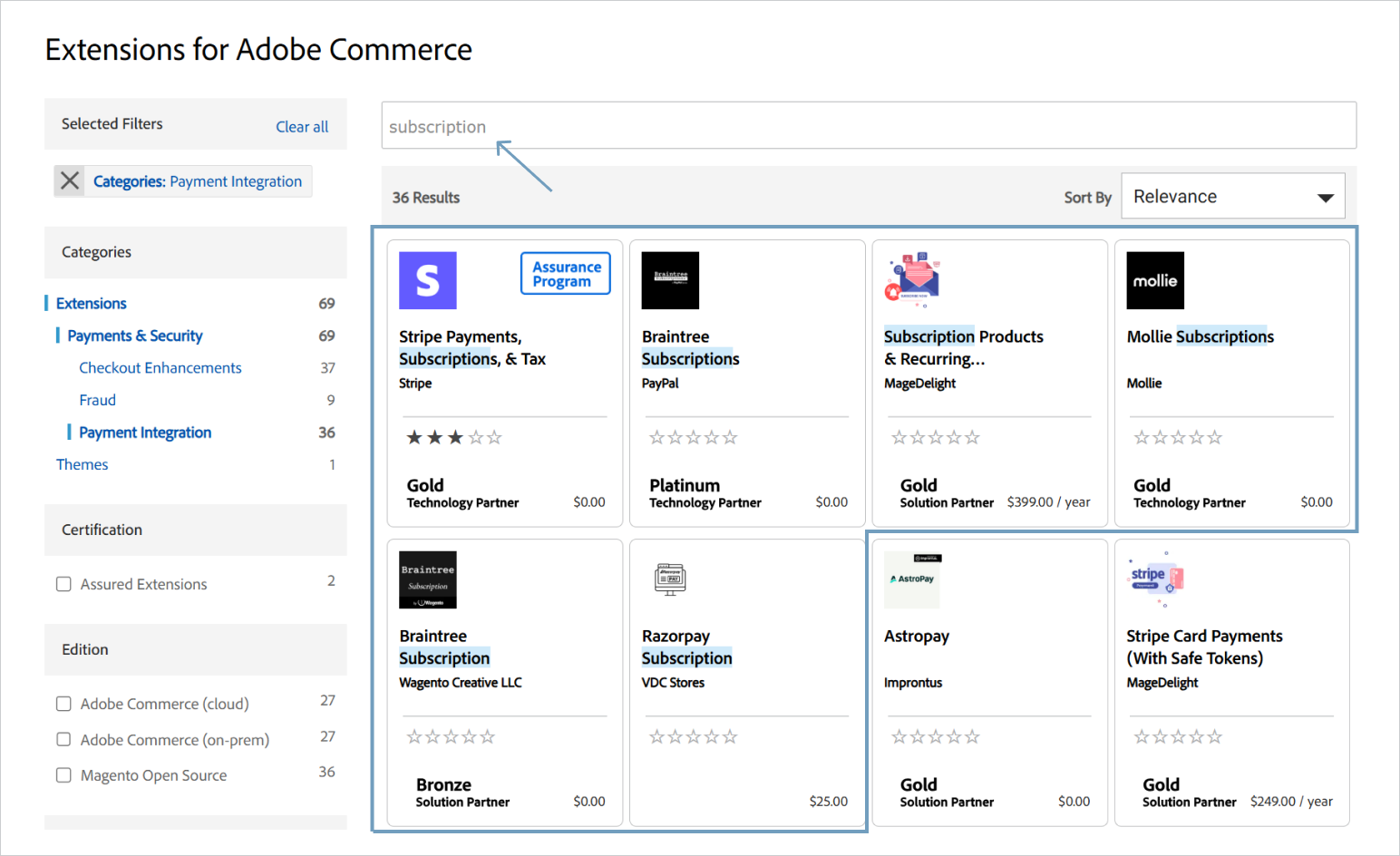
Explore the detailed descriptions of the modules you’ve found to better understand their capabilities. You may create a simple comparison table with brief notes for clarity. Below is an example table for four subscription extensions from the previous step.
| Extension | Key features |
|---|---|
| Stripe Payments, Subscriptions, & Tax by Stripe | • Comprehensive solution for payments, subscriptions, and tax automation • Coverage: 195 countries, 135+ currencies, 100+ payment methods • Optimized checkout solution from Stripe • Flexible billing management • AI-powered failed payment recovery • B2B support: invoicing and bank transfers • Security: PCI-DSS Level 1, PSD2 SCA Prerequisites: requires existing Stripe account |
| Braintree Subscriptions by PayPal | • Extension of the official Braintree/PayPal functionality • Basic subscription management: purchase, pause, amend, tracking in admin panel • Recurring payments via Braintree and PayPal • Security: PCI-compliant, tokenization Prerequisites: requires existing Braintree account and connected RabbitMQ to Magento |
| Subscription Products & Recurring Payments by MageDelight | • Compatible with 100+ payment gateways • Offline payment support • Customers can skip, pause, resume, or cancel subscriptions • Supports all Magento product types • Additional features: purchase subscription and one-time products together; e-wallet support |
| Mollie Subscriptions by Mollie | • Direct integration with Mollie API • Transparent pricing: only pay for successful transactions • Customers can view next payment date, cancel/continue subscription • Security: PCI-DSS Level 1, full compliance with European regulations Prerequisites: requires existing Mollie account and installed the official Mollie Payment extension |
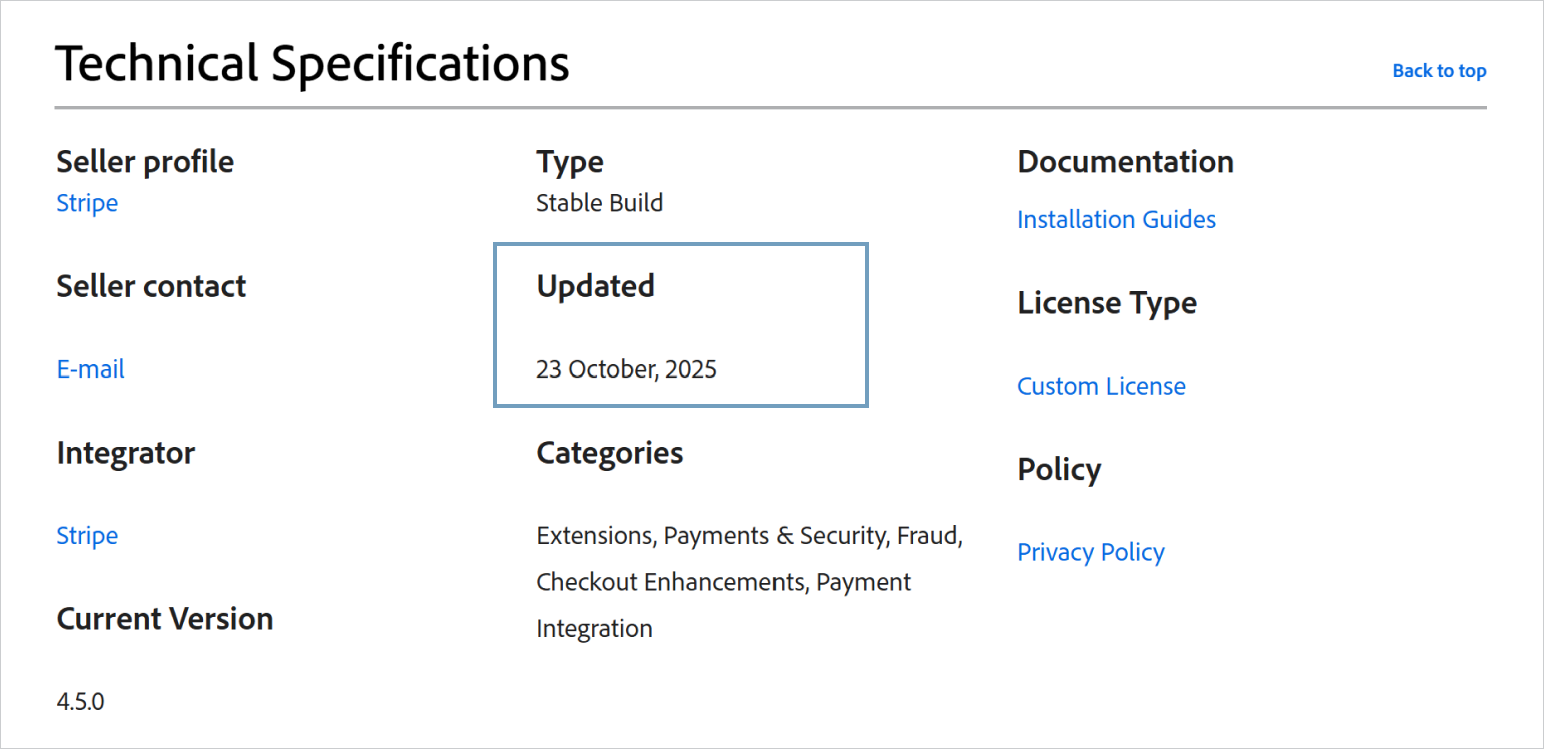
Since Magento receives regular updates, third-party modules must stay compatible with the latest platform version. Some providers release a module and then stop supporting it, which eventually causes functionality issues after a few Magento updates. For you, this can result in additional costs to pay for Magento development services.
You can find the last update date in the Technical Specifications section on the extension’s description page.
When selecting your best Magento 2 extension, pay close attention to user feedback and the provider’s reputation. Unfortunately, most description pages on the Adobe Commerce Marketplace have few or no reviews. Feedback on the provider’s own website also shouldn’t be fully trusted, as it may be moderated.
For a more objective view, look for opinions on independent platforms and forums. For instance, check the Magento subreddit, where you can also ask questions about specific modules if no discussions exist yet.
Reliable free support from the provider is important in the first months after integration. Some providers offer three months of free support, others up to six, while some charge for assistance right away. (Note: this applies to paid extensions – free ones usually don’t include support.)
If the support terms aren’t listed, use the contact information in the Support section on the description page to clarify the details. You can also post your question in the Q&A section.
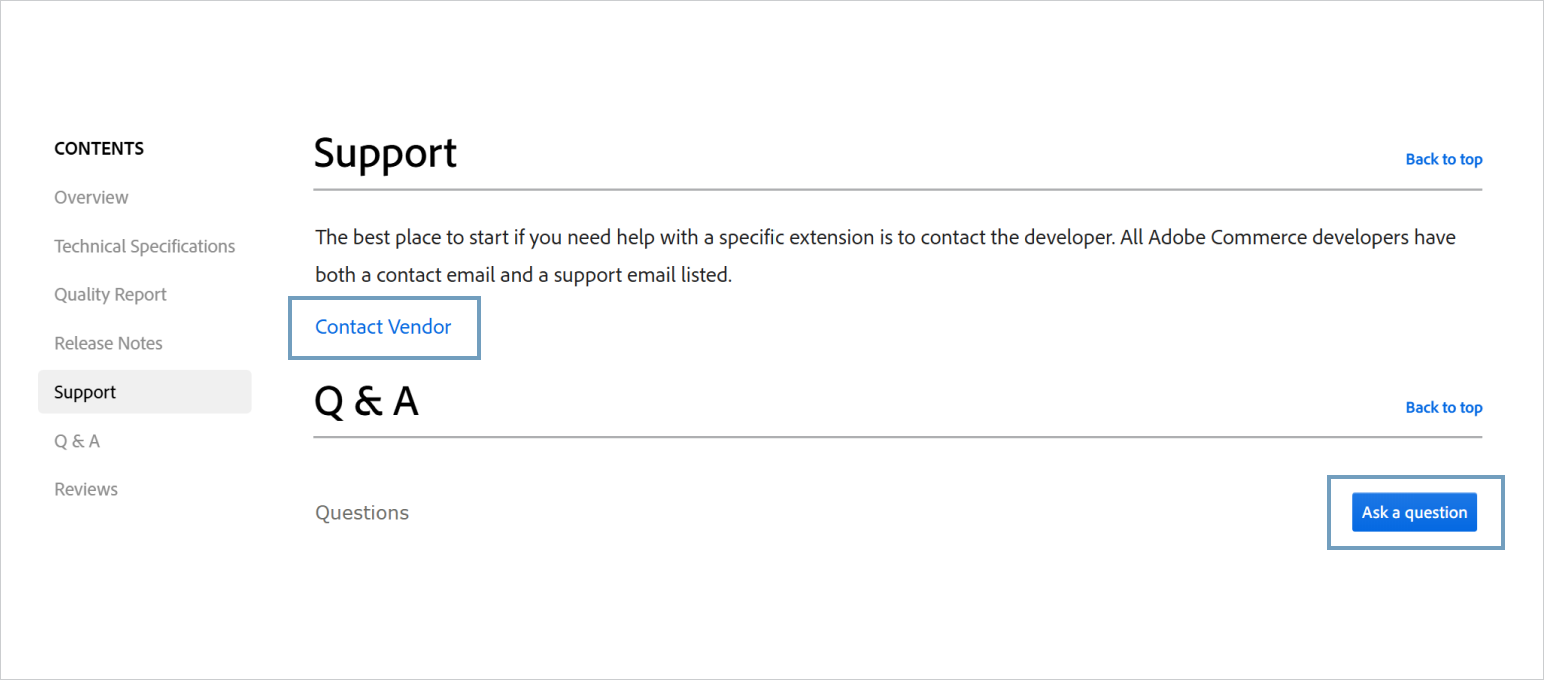
Even if you choose a top-rated Magento extension from a trusted provider, there’s always a chance it won’t work as expected. For paid modules, review the refund policy and confirm how long it applies. If the extension doesn’t perform properly after integration, you should be able to request a refund. If the seller won’t guarantee a refund during at least two weeks after purchase, it is better to bypass the module. After all, why should you be expected to buy into a product if its own creator won’t stand by it?
Since the Adobe Commerce Marketplace doesn’t have a dedicated refund section, check the extension description or contact the vendor directly, as in step 6. You can also find this information on the provider’s official website.
To better compare the pros and cons of all extensions that match your functional requirements, we recommend noting key information about each one in a summary table. You can see an example of how to organize it below.
We’ve also prepared templates for both tables mentioned in steps 3 and 8. To use them, open this Google Sheet and make a personal copy of the document.
| Extension | Stripe Payments, Subscriptions, & Tax by Stripe | Braintree Subscriptions by PayPal | Subscription Products & Recurring Payments by MageDelight | Mollie Subscriptions by Mollie |
|---|---|---|---|---|
| Price | Free* | Free* | $399 (1st year), then $209/year | Free* |
| Rating (Number of reviews) | 4.2 (42) | N/A | 5.0 (2) | N/A |
| Last update | A month ago | 3 months ago | 5 months ago | 7 months ago |
| Support | Online documentation | Online documentation | 1 year of free support | Online documentation |
| Money-back guarantee | N/A | N/A | 30-day | N/A |
*Applies only to this extension. Usage of Stripe, Braintree, or Mollie accounts involves separate transaction fees.
Once you’ve selected the module, install it and make sure it completely fits your store’s needs. We recommend testing the extension on a staging server first to verify that it:
If everything runs smoothly, you can confidently install the extension on your live store and start leveraging its features.
Unfortunately, integration with extensions from the marketplace doesn’t always bring only benefits. In some cases, they can introduce issues, such as:
For example, if the extension interacts with cookies processing (or other personal information from your customers), then a glitchy module can violate user privacy, thereby violating the GDPR.
If quality assurance testing detects any errors, the first thing to do is to contact the extension provider support team. This is when that free support period really pays off! Report the issues you’ve faced and give the provider a chance to fix them.
However, if the issue remains unresolved, you can try troubleshooting it yourself or with the help of your technical team. When none of the approaches works, the best option is to find an alternative module or consider developing a custom one tailored to your needs.
Custom Magento extension development becomes a justified and strategic choice when:
This approach is highly beneficial, as it gives you full control over the extension’s functionality, performance, and compatibility.

In some cases, even the best Magento extensions available on the market cannot fully meet the unique requirements of a store. That’s exactly when custom development becomes the most effective solution.With our Magento extension development services, we help ecommerce businesses extend native functionality of their stores, improve performance, and overcome limitations of off-the-shelf modules. Explore a few examples of how we’ve helped our clients achieve more with custom solutions.

We developed a custom Magento plugin for a photo lab. They print non-standard sized photos on unique materials. We implemented a complex JS-frontend as the main feature of the extension is its ability to determine the quality of uploaded images. Our extension enables users to identify and display the maximum size of the image that can be printed. The customer sees the visualization right on the product page.
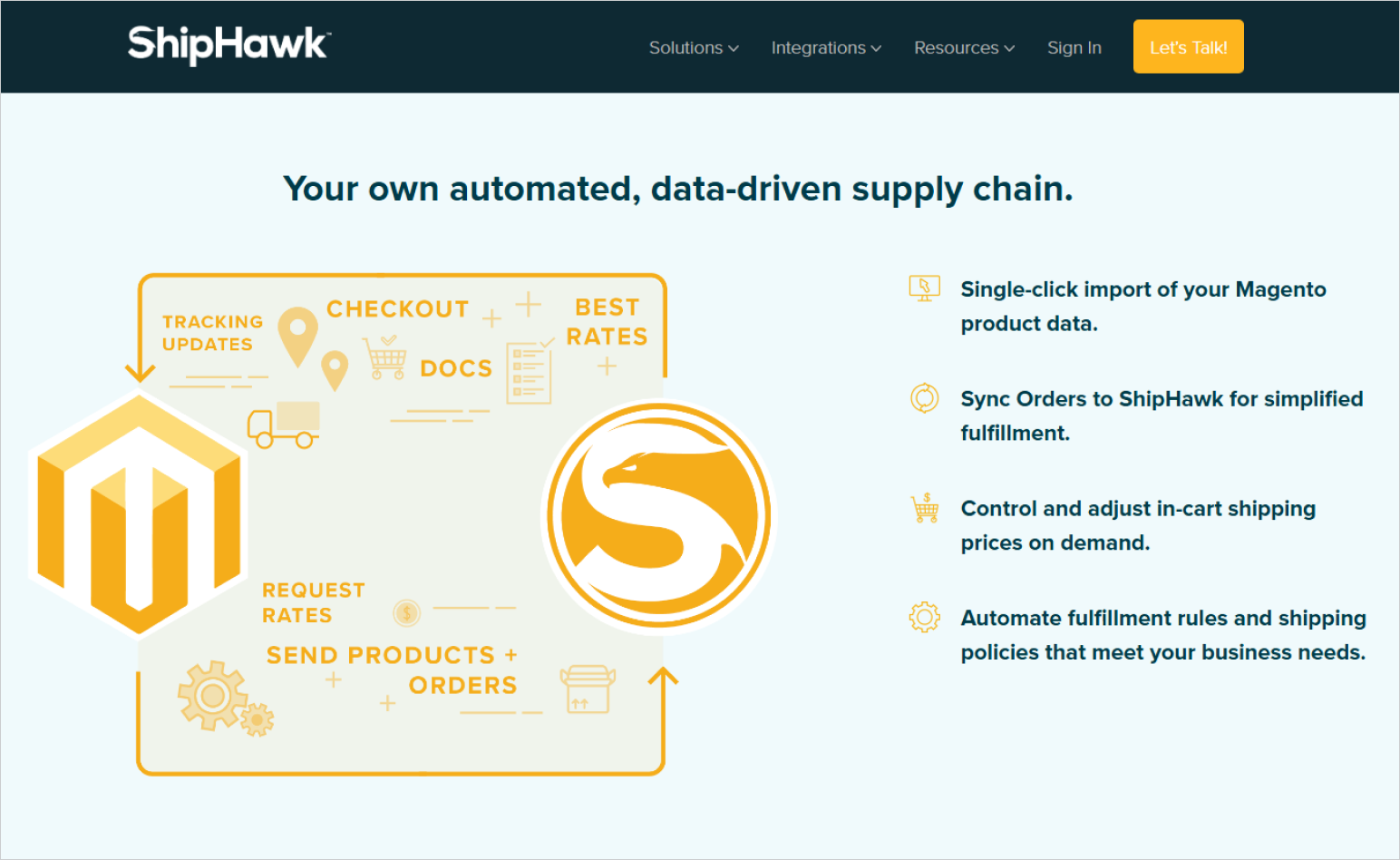
A worldwide shipping company, whose main clients are ecommerce businesses with oversized and non-standard goods. They approached us to develop an extension so their services could be used by online stores on the Magento platform. We’ve successfully delivered the solution, and today Shiphawk services can be easily integrated with any Magento-based ecommerce store.
We also built a custom payment module for a well-known payment processing platform. This Magento 2 extension simplifies on-boarding of new ecommerce businesses. Its main feature was a native token-based JavaScript payment processing integration embedded directly into the checkout page. This way stores don’t need to go through PCI Compliance (payment card industry data security standard).
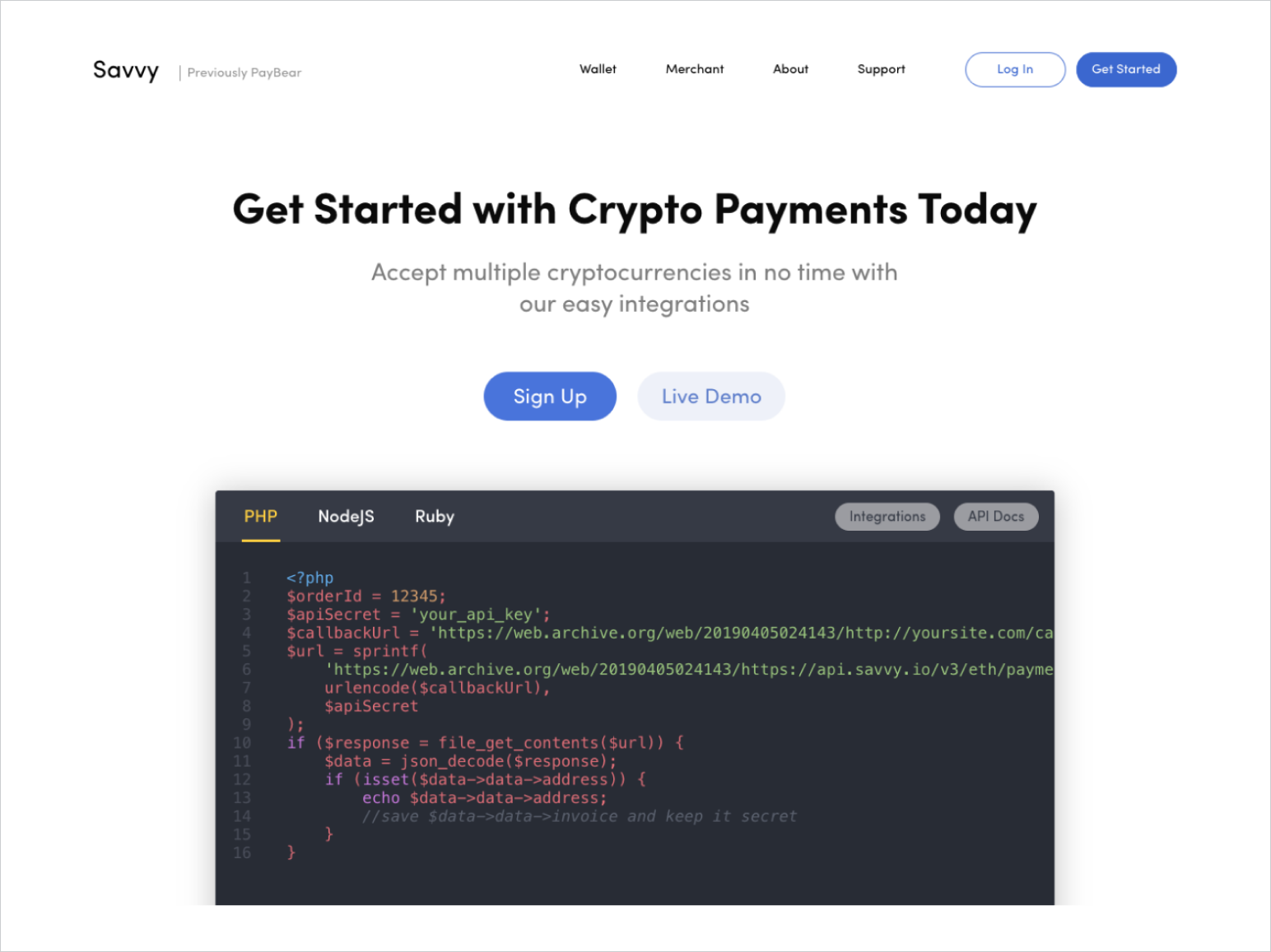
We completed a similar task to Checkout.com’s, a cryptocurrency payment service Savvy. Cryptocurrency transactions are not instant and require delayed transaction notifications. Processing of crypto payments is different from credit cards or e-wallet payments. That’s why, in this case, we couldn’t apply standard methods of payment module development, and used a custom approach tailored to Savvy’s specific requirements.
All the best Magento extensions we developed for our customers meet the following requirements:
Choosing the right Magento extensions from the Adobe Commerce Marketplace or deciding to develop a custom one can feel overwhelming. Our team curated this guide based on years of practical experience to help you make informed choices and avoid common pitfalls when enhancing your store’s functionality.Our last piece of advice? If you’re considering a custom Magento extension development, but lack technical resources to complete it, Whidegroup experts are ready to help. Feel free to drop us a line. We’ll be glad to discuss your requirements and find the best solution for your store.


 Top Magento Conversion Optimization Tips for 2026